
Quick Answer
Conversational AI for accounts receivable lets finance teams ask plain-English questions and receive cited, audit-logged answers grounded in real AR records. It works through four layers: intent parsing, entity resolution, safe query execution, and narrative response.
Key Takeaways
- Conversational AI replaces 4-7 dashboard filter clicks with one plain-English question, cutting time per ad-hoc AR query from 8-12 minutes to under 30 seconds.
- The architecture has 4 layers: NLP intent parsing, entity resolution against your AR schema, parameterised read-only query execution, and a cited narrative response.
- Schema grounding prevents hallucinations; every numeric claim in an Assist answer cites the invoice IDs and rows it was derived from.
- Guardrails matter as much as accuracy: role inheritance, typed confirmation for write actions, and a full exportable audit log preserve SOC 2 controls.
- Per-question time drops by roughly 95%, and the volume of questions controllers actually ask their data rises 3-5x, surfacing AR risks that previously stayed hidden.
See SINGOA Assist answer your AR questions live
Bring three real ad-hoc questions you've asked your AR team this quarter. We'll answer them on your own data in a 15-minute demo.
Why dashboards are losing to plain-English questions
It is 4:47 PM on a Thursday and your CFO sends a one-line Slack: "What's our exposure on the top 10 customers past 60 days?" Twelve minutes later you are still clicking through aging filters, customer segments, and a date picker that resets every time you change columns. According to the PYMNTS 2025 B2B Payments Report, 68% of mid-market finance teams answer fewer than half of the ad-hoc AR questions they receive each week. The bottleneck is not the data. The bottleneck is the dashboard.
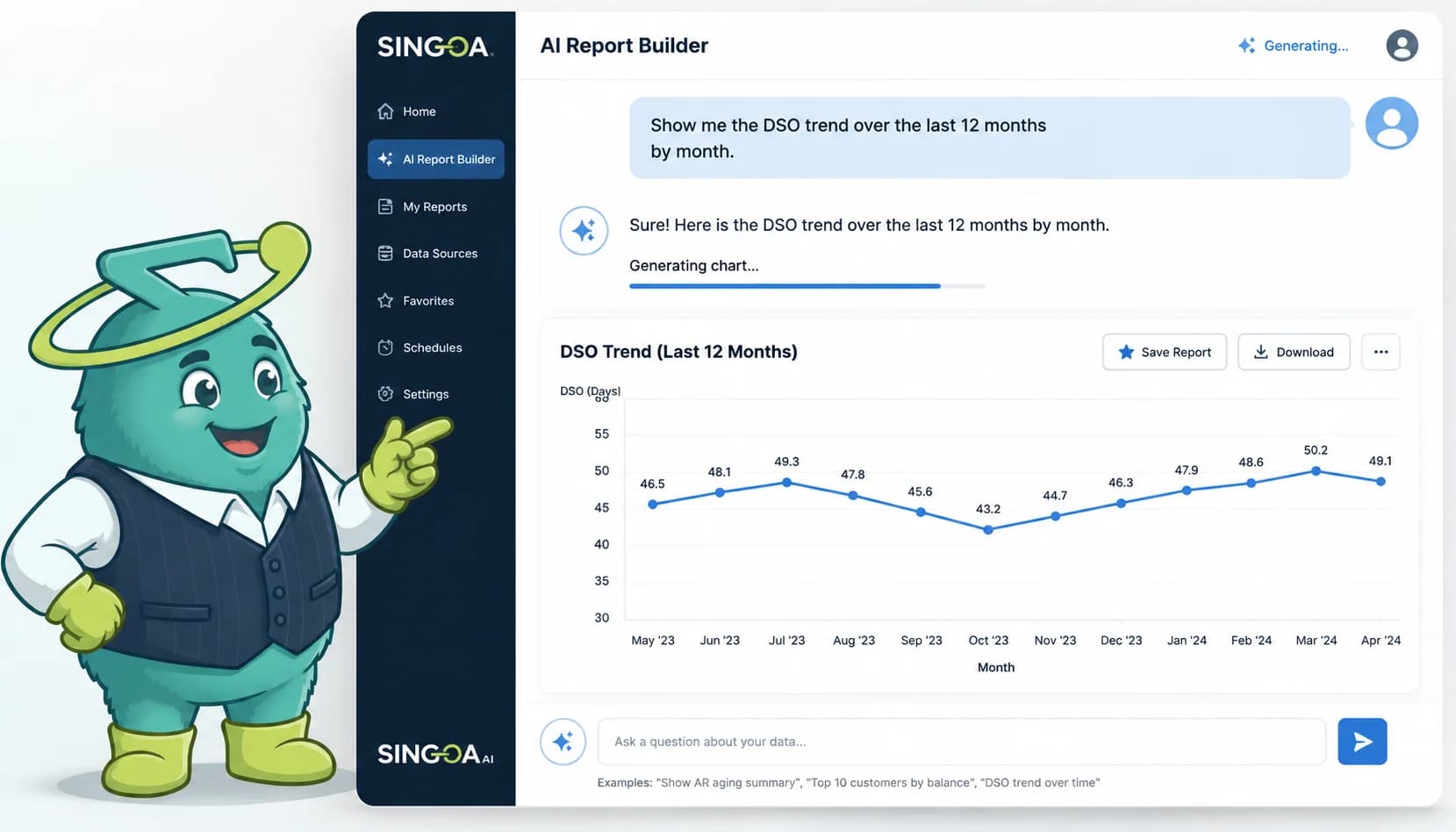
Conversational AI for accounts receivable changes the surface. Instead of hunting for the right chart, controllers type the question itself: "Show me invoices over 60 days for our top 10 customers, sorted by amount." A grounded AI assistant parses that sentence, resolves the entities against your real AR schema, runs a parameterised read-only query, and returns a cited answer in under 30 seconds. Same data, same permissions, different interface.
This is a technical validation piece, not a marketing tour. If you are a Controller or AR Manager evaluating AI accounts receivable software, you need to understand what is actually happening between the question and the answer. Where does the model touch your data? How are hallucinations prevented? What does the audit log look like when your auditor asks how a number was produced? Those questions deserve specific answers, not slogans.
Across the next eight sections, we walk through the four-layer architecture behind a conversational AR assistant: intent parsing, entity resolution, safe query execution, and narrative response. We compare it head-to-head against the manual filter chain on six real questions. And we close with the guardrails that decide whether this technology belongs in a finance stack at all.
Walk into any AR team on the third week of the month and you will see the same workflow. A CFO question lands in Slack. The controller opens the aging dashboard, sets a date filter, picks an aging bucket, layers a customer segment, sorts by amount, and exports to a spreadsheet that needs three more columns. Internal benchmarking we have done with mid-market AR teams puts that filter chain at 4 to 7 clicks for a typical question, and 8 to 12 minutes from prompt to defensible answer.
Multiply that by every ad-hoc question a finance leader files in a quarter and you find the real cost. Per the PYMNTS 2025 B2B Payments Report, mid-market controllers field 35 to 60 ad-hoc AR questions a week from CFOs, treasury, and sales. Roughly 30 to 40% of those questions never get answered with structured data; the controller either replies from memory or kicks the question to a stale spreadsheet. The data exists. The interface buries it.
Conversational AI flips the model. Instead of clicking your way to a chart that approximates the answer, you type the question and a grounded AI produces the exact slice of AR data. If your team is still tracking the [AR KPIs CFOs track every month](/blog/accounts-receivable-kpis-cfo-track) through filtered exports, the lift is not subtle. Here is where it gets interesting: when the cost of asking drops to seconds, controllers start asking the second-order questions they used to skip, and that is where hidden AR risk surfaces.
68%
Mid-market finance teams answering fewer than half of weekly ad-hoc AR questions
4-7
Clicks per typical AR filter-chain question
8-12
Minutes from prompt to defensible answer via manual filtering
35-60
Ad-hoc AR questions a mid-market controller fields per week
The four-layer architecture behind SINGOA Assist
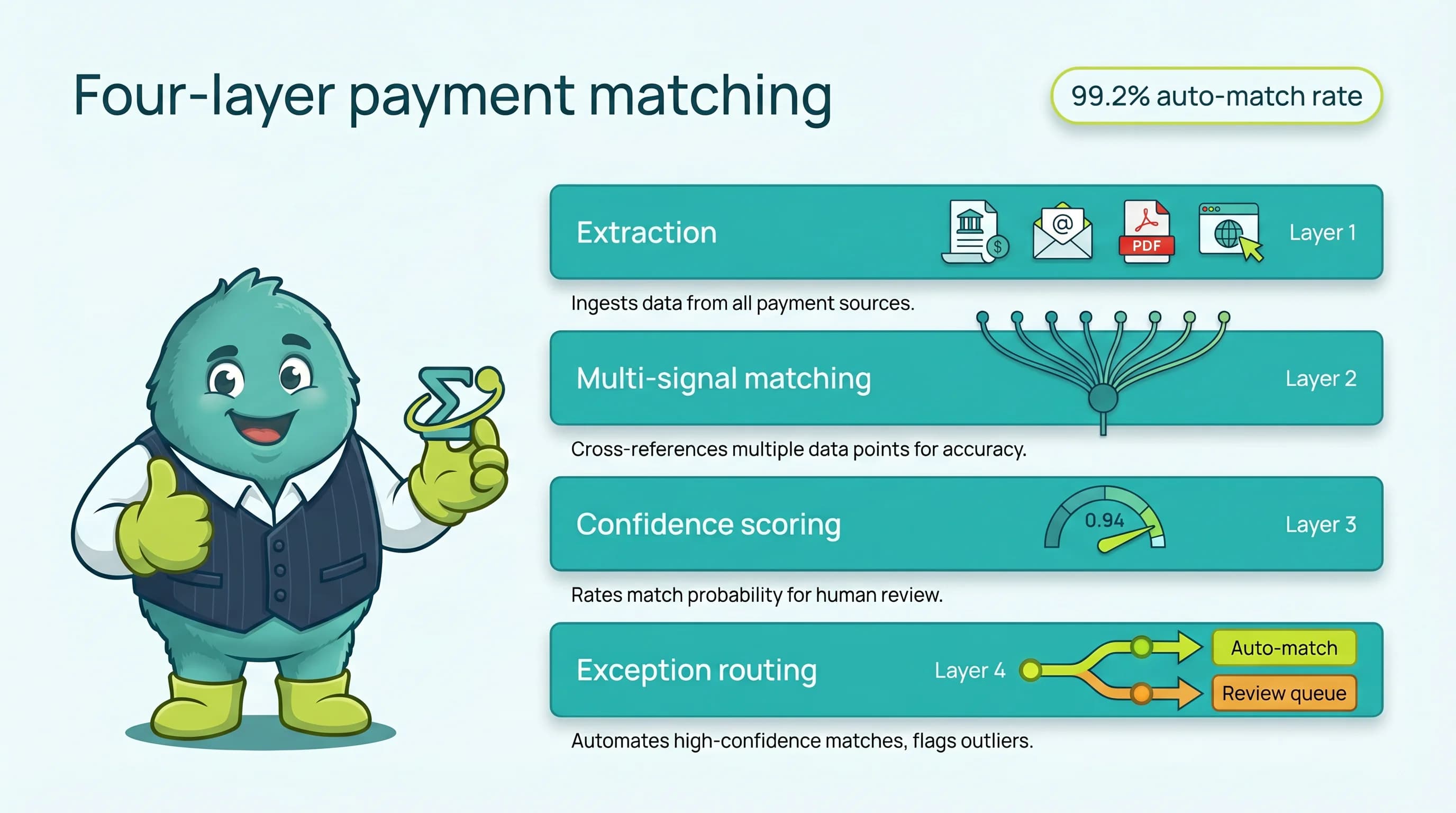
SINGOA Assist resolves a plain-English AR question through four engineered layers. Each layer has a single job and a clean handoff to the next, which is why the system produces cited, reproducible answers instead of plausible-sounding text.
Layer 1: Intent parsing, turning a sentence into a structured query
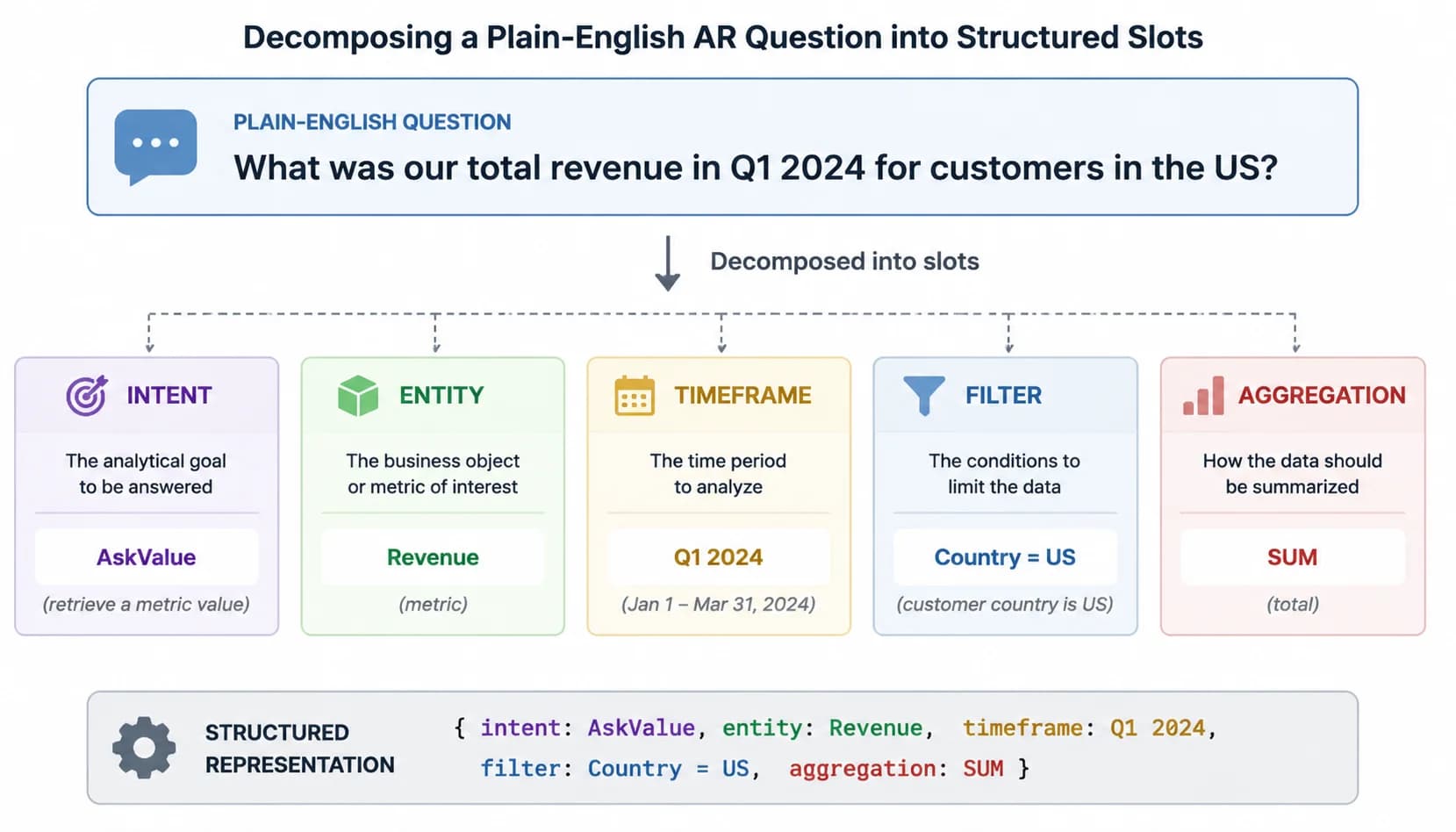
Intent parsing is the first layer of a conversational AR assistant. An NLP model converts a controller's plain-English question into a structured query plan with five slots: intent class, entity, time range, filter, and aggregation. Nothing touches your AR database until those slots are filled and validated.
Start with a real question: "How much is Acme past 30 days right now, and is that worse than last month?" To a human it reads as one thought. To the parser it is six separate decisions. The intent class is aging-and-trend. The entity is a customer named Acme. The aging threshold is 30 days. The reference point is current state. The comparison is month-over-month. The aggregation is total open balance. Every one of those slots has to be filled correctly before a query gets generated.
AR-specific assistants ship with a fixed taxonomy of intent classes, usually five to eight: aging, DSO, customer health, dispute status, cash forecast, payment matching, collections priority, and credit exposure. Constraining the intent space is a design choice with real consequences. A general-purpose model might interpret "customer health" as a sentiment analysis task; an AR-grade parser binds it to a defined score that combines days-late, payment variance, and dispute frequency. That constraint is what makes the answers reproducible.
Slot filling matters even more than intent classification. The parser has to extract customer names, currencies, date ranges, thresholds, and sort orders without inventing any of them. If the user says "top customers" with no metric, the assistant should not silently default to revenue. It should ask one clarifying question: "Top by open balance, by overdue amount, or by total billed YTD?" That single design decision, asking instead of guessing, is the difference between a tool finance trusts and a chat toy.
- Fixed AR intent taxonomy with 5-8 supported classes
- Five-slot query plan: intent, entity, time range, filter, aggregation
- One-question clarification flow when a slot cannot be resolved
- Pro tip: If the parser cannot resolve a slot, like "top customers" with no metric specified, Assist asks one clarifying question rather than guessing. This single design choice prevents the majority of hallucinated answers before they ever reach the database layer.
Layer 2: Entity resolution against your AR schema
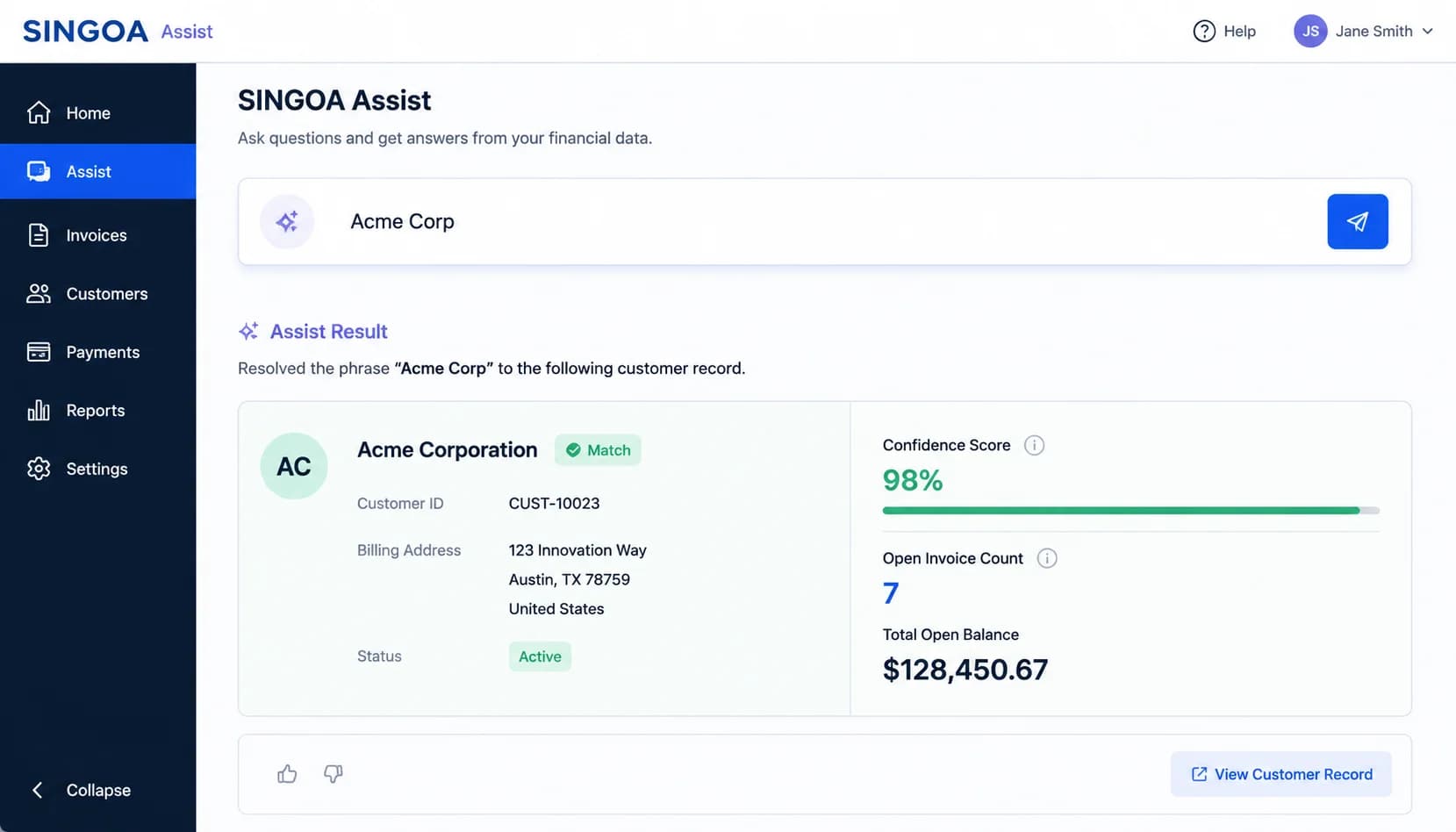
Entity resolution maps parsed terms (customer names, invoice references, aging buckets) to the actual records in your ERP-synced AR schema before any query runs. This grounding step is what separates a finance-grade AI assistant from a generic chatbot that can invent plausible-sounding numbers.
Your ERP probably contains the same customer three or four times. "Acme Corp", "Acme Corporation", "ACME CORP.", and "Acme Co." might be one buyer or might be three subsidiaries with separate AR ledgers. When a controller types "Acme", the assistant cannot afford to guess. Entity resolution runs a fuzzy match against your customer master, returns the top candidates with confidence scores, and either auto-selects on a high-confidence hit or asks the user to confirm. The same logic applies to invoice numbers, currencies, and aging buckets defined in your chart of accounts.
The vocabulary itself is schema-grounded. "Over 60 days" maps to the specific aging bucket your finance org has defined, not a generic 31-60 or 61-90 range borrowed from a template. "Disputed" resolves to the dispute codes actually used in your ERP, including any custom reason codes your team has added over the years. This is why a conversational AR tool that has not been pointed at your real schema cannot give you defensible answers, no matter how large its model.
Grounding is the entire defense against hallucination. A model that generates an answer from learned patterns will produce numbers that look right. A model that generates a query against your schema and then reads the result back can only answer with data that exists. For a deeper read on [how AR-grade AI prevents hallucinations](/blog/ai-hallucinations-ar-automation-cfo-guide), the underlying mechanism is the same: never let the language model produce the number. Let it produce the question, and let the database produce the number. The real question is whether your vendor can show you exactly where that handoff happens.
- Fuzzy customer matching with confidence scoring across ERP naming variations
- Schema-grounded vocabulary for aging buckets, dispute codes, and currencies
- Confirmation prompt on low-confidence entity matches
- Zero free-text number generation: the model produces queries, the database produces values
Layer 3: Safe query generation and execution
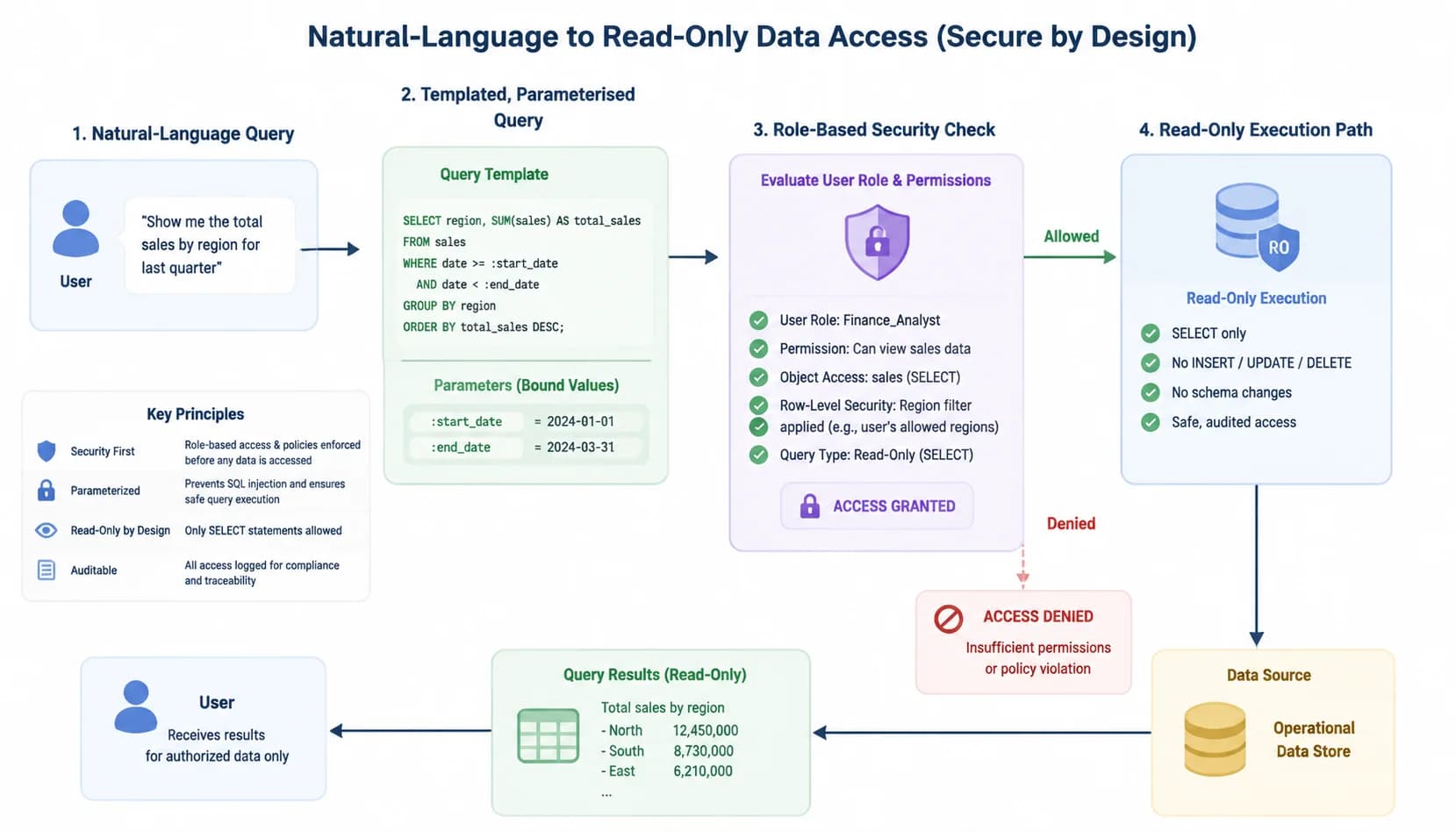
Safe query execution is the third architectural layer. The AI generates a parameterised, read-only query against your AR data warehouse using vetted templates, never free-form SQL. Row-level security inherits the user's existing AR role, and any write action requires explicit typed confirmation outside the chat flow.
Free-form SQL generation by a language model is a security and accuracy nightmare. The model can produce a query that joins the wrong tables, omits a tenant filter, or includes a subquery that times out the database. AR-grade assistants do not work that way. They ship with a library of templated query patterns, one per supported intent, with parameter slots that the parser fills. The model chooses the template and the parameters; the SQL itself is engineering-reviewed code that already exists in the system.
Read-only by default is the second hard rule. Every Assist query runs against a role that has SELECT permissions on AR tables and nothing else. If a user asks the assistant to write off an invoice or post a credit memo, the system does not execute. It surfaces a draft action, requires the user to type a confirmation phrase, and routes the action through the same approval workflow the ERP already enforces. According to [OWASP guidance on AI query injection](https://owasp.org/), this separation of generation and execution is the baseline control for any AI that touches production data.
Row-level security is inherited, not bolted on. If a regional controller can only see invoices for the East region in your ERP, the Assist session running under their identity sees exactly the same scope. The model does not get a privileged service account. This matters more than it sounds, because it means the AI cannot leak data across business units or surface customer balances to a user who would not otherwise have access. The query runs as the user, with the user's permissions, against the user's allowed rows. That is the only way conversational AI belongs anywhere near financial data.
- Templated, engineering-reviewed query patterns instead of free-form SQL
- Read-only default with typed confirmation for any write action
- Row-level security inherited from existing AR roles, no privileged service account
- Approval workflow routing for posting actions through the ERP
Layer 4: Narrative response with citations and audit log
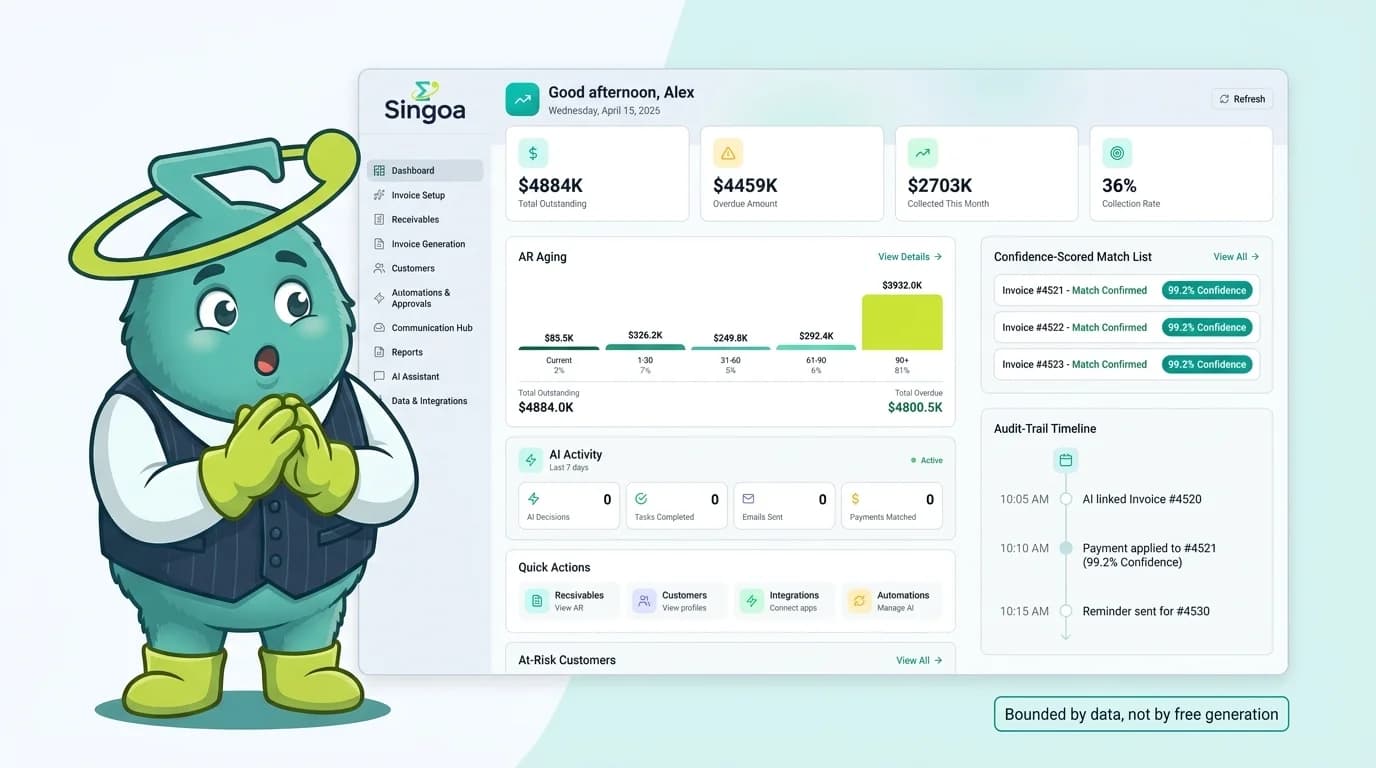
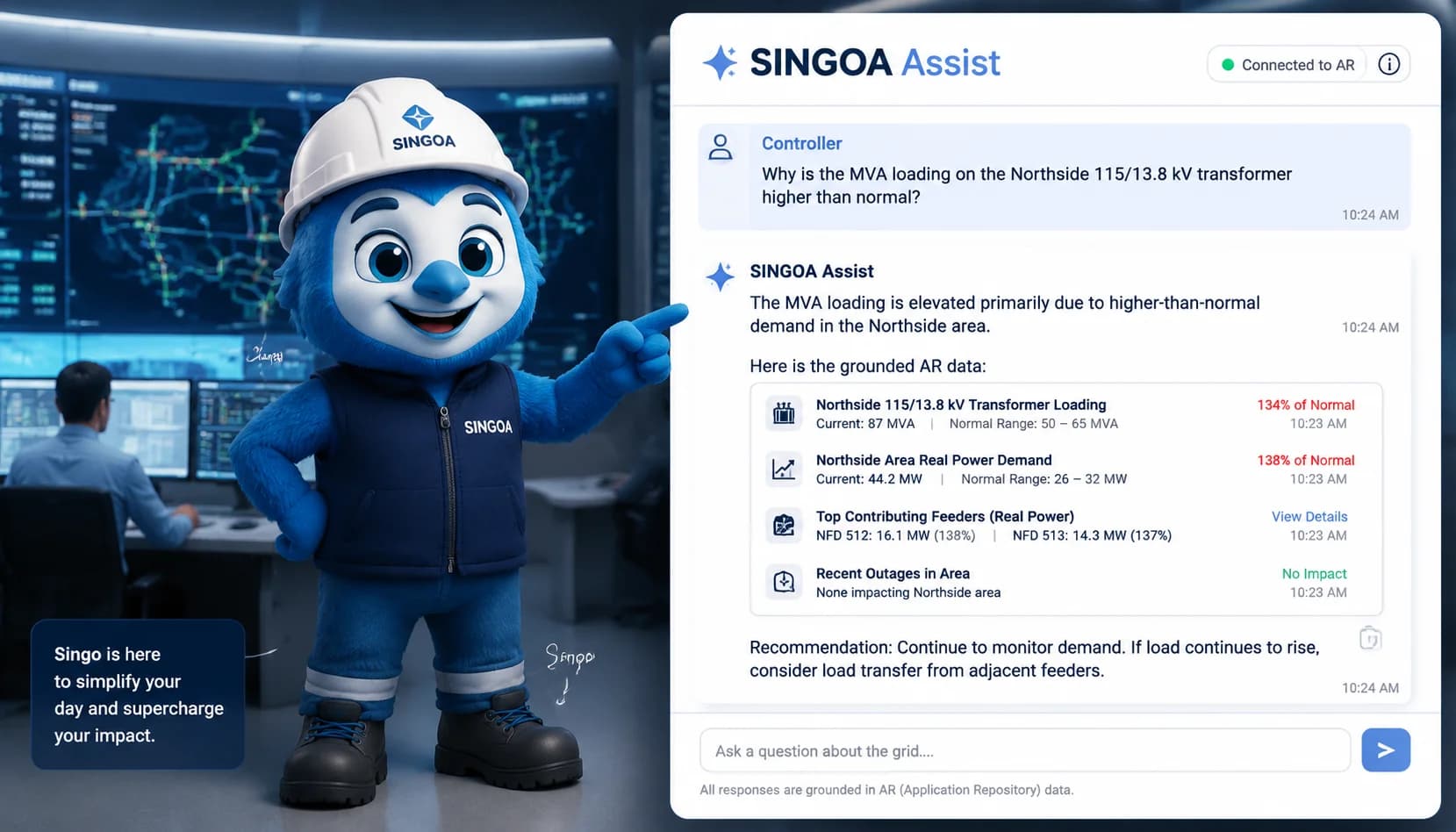
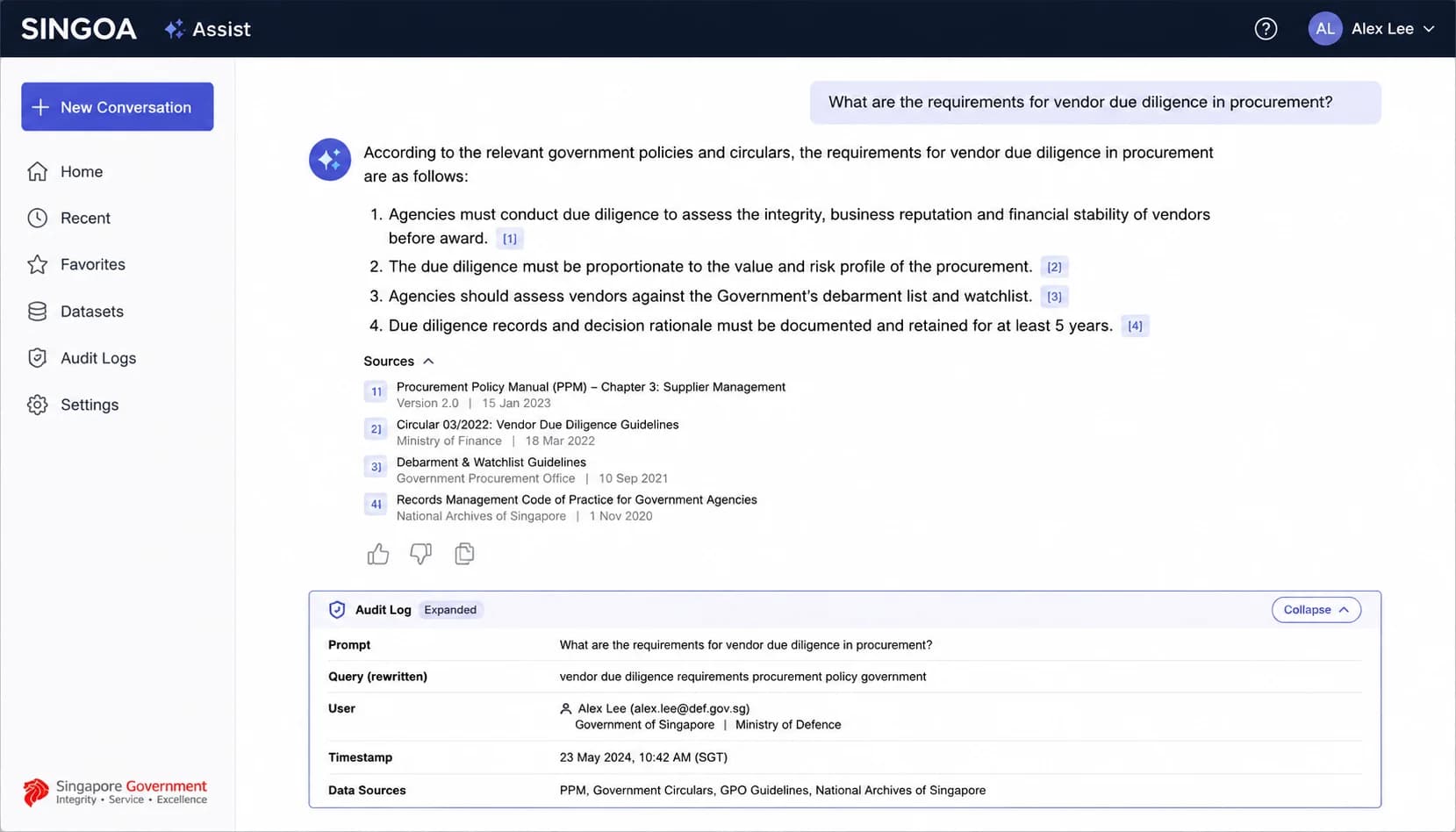
Every Assist answer cites the underlying records (invoice IDs, customer IDs, query timestamp) and writes a full audit log entry covering user identity, original prompt, generated query, rows returned, and execution time. This is what makes a conversational answer reproducible and defensible during a SOC 2 review.
A correct number with no provenance is not enough for finance. When the assistant returns "$847,230 in invoices over 60 days across the top 10 customers", the response includes the underlying invoice IDs, customer IDs, and the exact timestamp of the query. Click into any number and you see the source rows. This is the audit-trail equivalent of showing your work on a tied-out spreadsheet, except the work is the literal SQL the AI ran on your behalf.
The audit log is the second half of the same idea. Every Assist interaction writes a row capturing the user identity, the original natural-language prompt, the resolved entities, the templated query that ran, the parameter values, the row count returned, and the response timestamp. The log is exportable to CSV or pushed to your SIEM. When an auditor asks how a number in the board deck was produced, the answer is not memory or screenshots; it is a logged event that can be replayed.
This is also where vendor claims meet reality. Many tools market "AI for finance" without ever showing you the query they ran. That is not a deep-dive technical objection. It is a controls gap that will surface the first time an external auditor asks for evidence of how a reported figure was derived. The bar is simple: if the assistant cannot show you the underlying query and a complete audit trail, it does not belong in a regulated AR workflow.
- Inline source citations linking each numeric claim to its underlying rows
- Full audit log: user, prompt, resolved entities, query, parameters, row count, timestamp
- CSV export and SIEM forwarding for SOC 2 evidence
- Pro tip: Ask your vendor for a sample audit-log export before signing. If they cannot show you the literal query the AI ran against your data, plus the user identity and timestamp, you have no defense in an audit and no real way to reproduce a disputed number.
Quantify the time your team spends filtering
Plug in your controller headcount and weekly ad-hoc question volume to see the hours conversational AI reclaims.
Business impact: time saved, questions actually asked
First-order: time per ad-hoc question collapses
The first-order benefit is the easy one. A question that took 8 to 12 minutes through a filter chain now resolves in under 30 seconds. The IOFM 2025 AR Benchmark puts the median mid-market controller at 35 to 60 ad-hoc questions a week. Even at the low end, that is roughly 5 hours per controller per week recovered, or about a quarter of a full-time week. Across a four-person AR team, the math compounds quickly into a meaningful capacity gain.
Conversational AI for AR cuts the time per ad-hoc question from 8-12 minutes to under 30 seconds, a roughly 95% reduction. The capacity gain is largest on the long tail of one-off CFO questions that previously consumed disproportionate controller time.
8-12 min
Time per ad-hoc AR question, manual filter chain
< 30 sec
Time per ad-hoc AR question, SINGOA Assist
~ 5 hrs
Hours reclaimed per controller per week
Second-order: question volume rises, hidden risk surfaces
The second-order effect is the one buyers consistently underestimate. When the cost of asking a question drops to seconds, controllers stop rationing the questions. They start asking the second and third questions they used to skip: "What is our payment variance on Acme this quarter versus last?", "Which customers had a dispute in the last 90 days and are now back over 60 days late?", "Has our top customer's days-late trended worse since the May credit limit change?" In customer panels, that question volume rises 3 to 5x within the first 60 days of deployment.
That volume change is where hidden AR risk surfaces. The expensive question, the one nobody asked because the filter chain was a 20-minute project, is often the one that would have caught the deteriorating customer six weeks earlier. Conversational AI is part of a larger shift toward [scaling AR operations without adding headcount](/blog/scale-ar-operations-without-adding-headcount), and the questions-asked metric is the early signal that the shift is working. What most people miss: the time saved is the small win. The risks caught earlier are the big one.
3-5x
Ad-hoc question volume increase within 60 days of deployment
~ 95%
Per-question time reduction
70-80%
Share of weekly AR questions answerable via direct query
Six AR questions, two interfaces
Real-World Scenario
DSO this month versus last
The Situation
A textbook CFO question. The manual workflow opens the DSO dashboard, sets the current month filter, exports, then repeats for the prior month and tiles the numbers into a Slack reply. Four clicks, eight minutes, and one transcription step that goes wrong roughly 5% of the time.
What SINGOA Does
The conversational workflow is one prompt: "What is our DSO this month versus last?" Assist returns both figures, the delta, the underlying invoice counts, and the timestamp. Under 30 seconds, zero transcription.
The Result
From eight minutes and a transcription risk to under 30 seconds with cited rows.
Real-World Scenario
Top-20 customers with invoices over 60 days
The Situation
Manual: open aging, set the 60+ bucket, layer top-customer ranking by revenue, sort by overdue amount, export to CSV. Six clicks, ten minutes, and the date picker resets twice on most BI tools.
What SINGOA Does
Conversational: "Show me my top 20 customers by revenue who have invoices over 60 days." The cited table appears with customer names, open balances, days-late, and links to the underlying invoice IDs.
The Result
Ten-minute filter chain compressed to one prompt with full citation.
Real-World Scenario
Disputes opened against Acme this quarter
The Situation
Manual: navigate to the disputes module, pick the customer, set the quarter, group by status, export. Five clicks, nine minutes, and a customer-master lookup if Acme has multiple subsidiary records.
What SINGOA Does
Conversational: "How many disputes were opened against Acme this quarter, by status?" Entity resolution disambiguates Acme subsidiaries up front, runs once, and returns the breakdown.
The Result
Subsidiary disambiguation handled before query runs, cutting nine minutes to under one.
Real-World Scenario
Cash forecast for next Friday based on confirmed promises
The Situation
Manual: open the promises module, filter by promise-to-pay date, export, then reconcile against payment history for promise reliability. Seven clicks, twelve minutes, and a model in a spreadsheet for the reliability adjustment.
What SINGOA Does
Conversational: "What is our expected cash for next Friday based on confirmed promises, weighted by promise reliability?" The reliability weight is part of the templated query.
The Result
A twelve-minute spreadsheet model replaced by a parameterised query with built-in weighting.
Real-World Scenario
Short-pays over $500 this month
The Situation
Manual: open the payment-matching exceptions queue, filter by short-pay reason, set the dollar threshold, export. Four clicks, seven minutes, and one Slack ping to confirm the cutoff.
What SINGOA Does
Conversational: "Show me short-pays over $500 this month, grouped by customer and reason code." Direct table, cited rows, sub-30-second response.
The Result
Exceptions queue inspection replaced by one prompt with grouped citations.
Real-World Scenario
Credit exposure on customers with declining payment scores
The Situation
Manual: pull the credit-exposure report, cross-reference against the customer-health score, filter for a downward trend, layer in current open balance. Six to seven clicks, eleven minutes, and a manual VLOOKUP across two exports.
What SINGOA Does
Conversational: "Which customers have declining payment scores in the last 90 days and what is our current credit exposure on each?" One query, cited rows, joined server-side.
The Result
VLOOKUP-driven exposure analysis replaced by a single grounded query in under 30 seconds.
Manual filter chain vs. SINGOA Assist: side-by-side
| Metric | Manual | SINGOA | Improvement |
|---|---|---|---|
| DSO this month vs. last | 4 clicks, 8 min, ~5% transcription error | 1 prompt, < 30 sec, 0% transcription error | 95% time saved, cited deltas |
| Top-20 customers over 60 days | 6 clicks, 10 min, date-picker resets | 1 prompt, < 30 sec, cited invoice IDs | 95% time saved, zero transcription |
| Disputes opened against Acme this quarter | 5 clicks, 9 min, subsidiary lookup | 1 prompt, < 30 sec, entity resolved up front | Subsidiary disambiguation built in |
| Cash forecast next Friday on promises | 7 clicks, 12 min, reliability model in spreadsheet | 1 prompt, < 30 sec, reliability-weighted query | Spreadsheet model eliminated |
| Short-pays over $500 this month | 4 clicks, 7 min, threshold confirmation | 1 prompt, < 30 sec, grouped by reason code | Confirmation step removed |
| Credit exposure on declining scores | 6-7 clicks, 11 min, manual VLOOKUP | 1 prompt, < 30 sec, server-side join | VLOOKUP eliminated, cited rows |