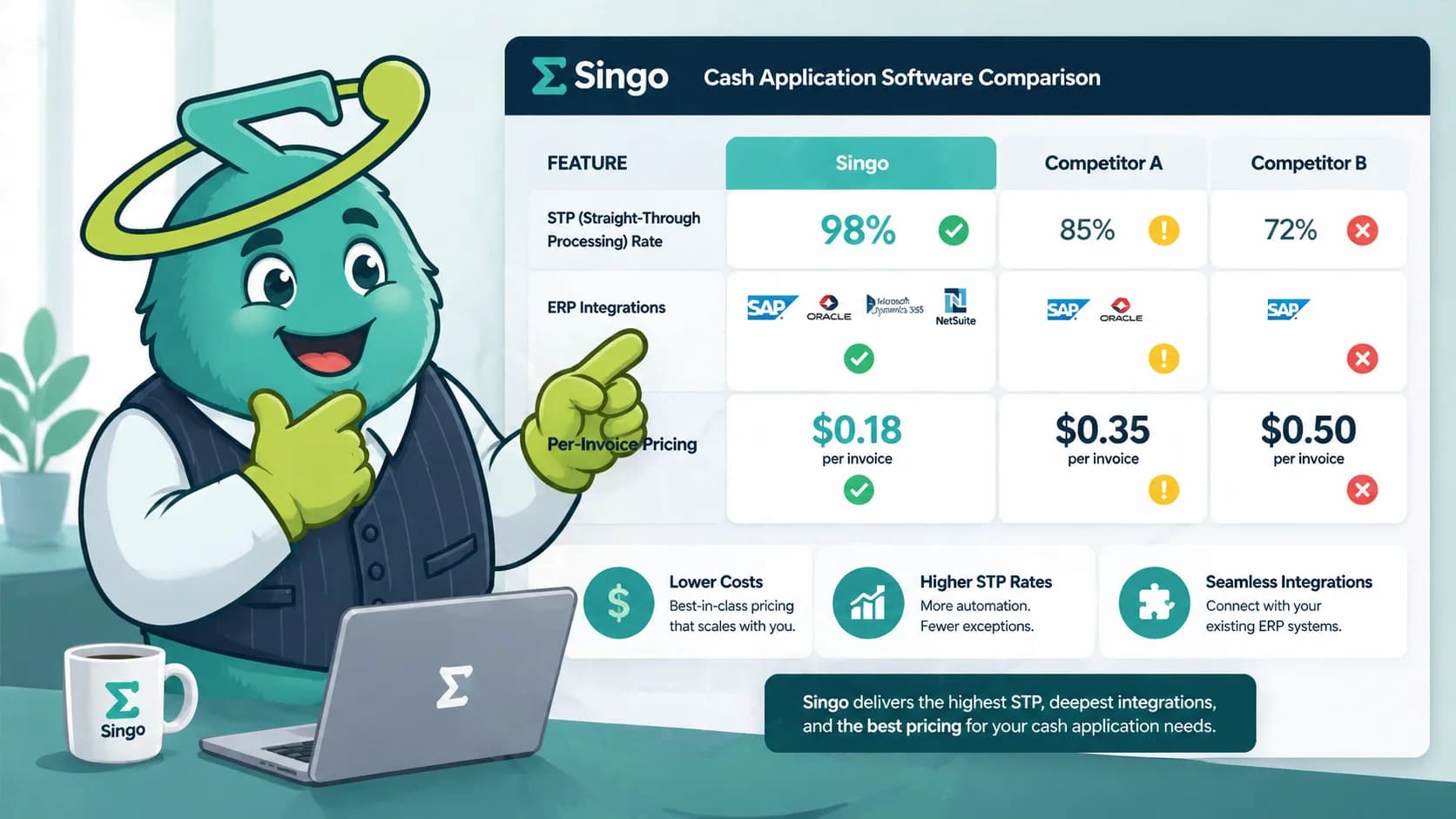

Quick Answer
Cash application software auto-matches customer payments to open invoices and posts cash to your ERP. Score vendors on STP rate (target 95%+), ERP fit, 2-4 week implementation, and $1-3 per-invoice pricing for mid-market.
Key Takeaways
- Cash application software replaces manual matching with AI; industry STP benchmarks run 90-95%, while platforms like SINGOA report 99.2% on AI matching.
- ERP-native cash application is adequate below 200 invoices per month. Above 500 monthly invoices, dedicated software pays back inside 6 months.
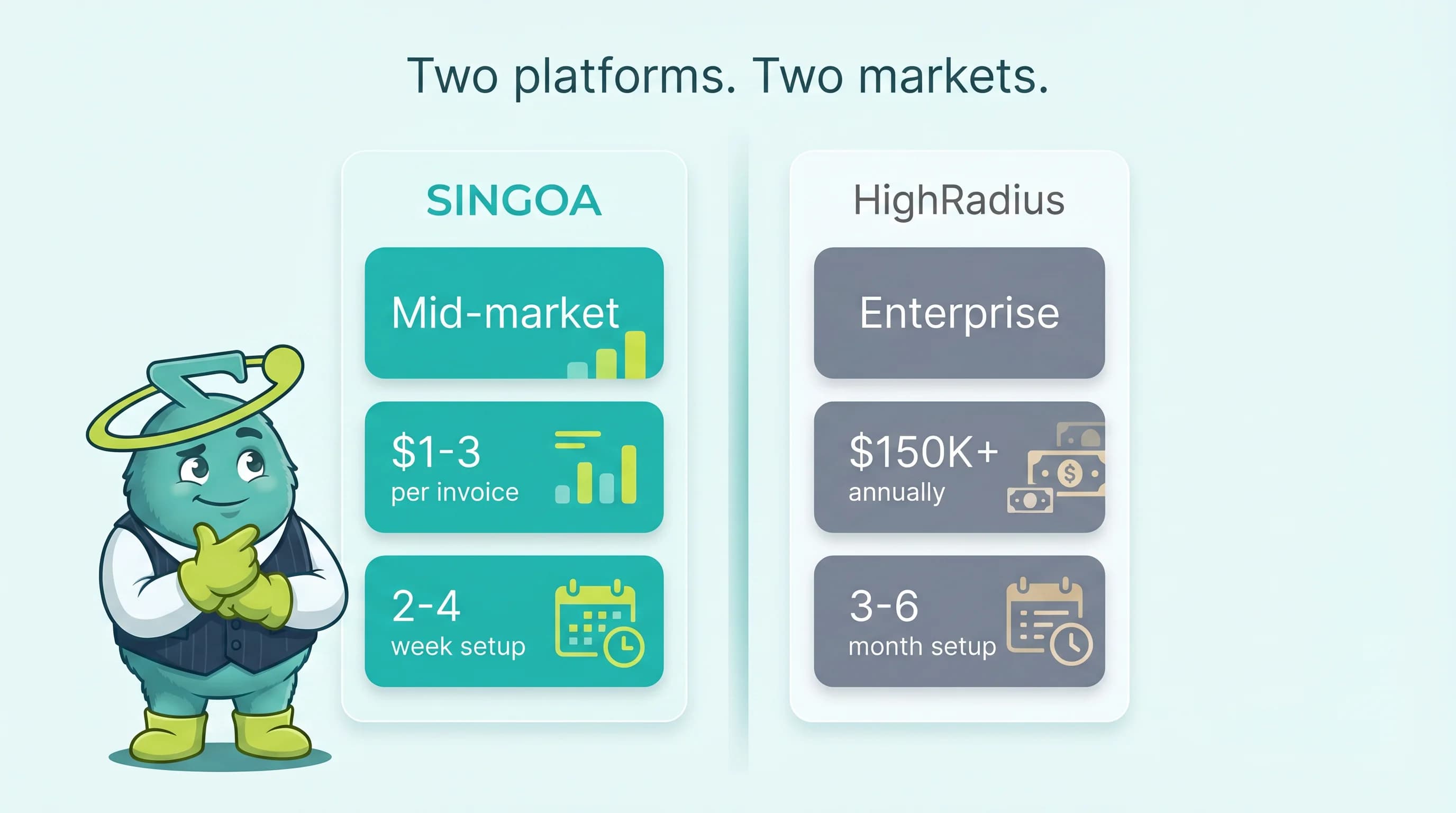
- Mid-market deployments run 2-4 weeks at $1-3 per invoice; enterprise platforms average 6-12 months and $50K-$500K license fees.
- Score vendors on 8 weighted criteria (STP, ERP fit, implementation, cost, exception UX, security, support, roadmap); anything under 70/100 should not advance.
- Five disqualifying red flags: STP claims with no methodology, ERP write-back as a paid add-on, no SOC 2 Type II, 12-month minimum, and PS-only implementation.
See your cash application ROI
Plug in your monthly invoice volume and current STP rate to see what 99.2% AI matching saves at $1-3 per invoice.
What cash application software actually does
Your AR clerk closes the lockbox file at 9 PM on the last day of the month, and 38% of incoming cash still has nowhere to land. The remittances arrived as PDF attachments, three customers paid two invoices with one wire, and a $42,000 deduction has no reason code. Sound familiar? Mid-market controllers describe the same scene every quarter, and in 2026 the budget to fix it finally exists.
Cash application software is the category buyers reach for when manual matching costs $15 to $40 per invoice fully loaded, while automated matching costs $1 to $3. The math is straightforward. The vendor selection is not. SERP results pit HighRadius and Billtrust against scrappier mid-market players, and every vendor quotes a different straight-through processing rate using different math.
This guide gives your buying committee the structure it actually needs. You get eight weighted scoring criteria, three pricing models compared at real volumes, six vendor profiles, and five red flags that should kill a deal on the spot. Skip the marketing pitches and use this as your RFP starter kit.
If you are evaluating cash application software for a $5M to $500M revenue AR team, the next 2,800 words save you a quarter of vendor discovery time. Copy the scorecard. Pressure-test the STP claims on your own remittance data. Then negotiate.
Cash application software automatically matches incoming customer payments (ACH, wire, check, card) to open invoices and posts the cleared cash to your ERP. It replaces the manual spreadsheet reconciliation AR clerks do today, eliminating the unapplied-cash queue that delays month-end close.
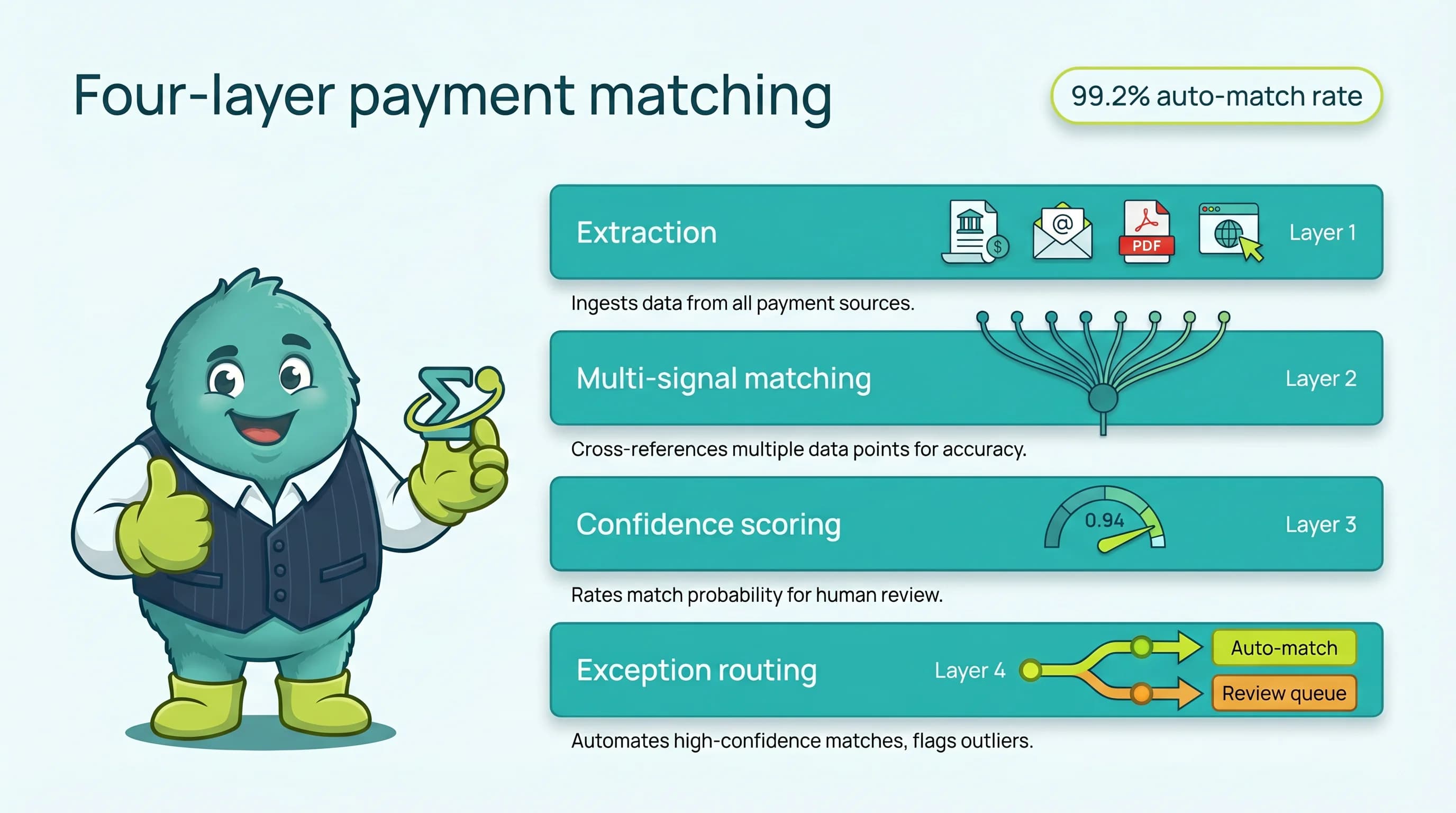
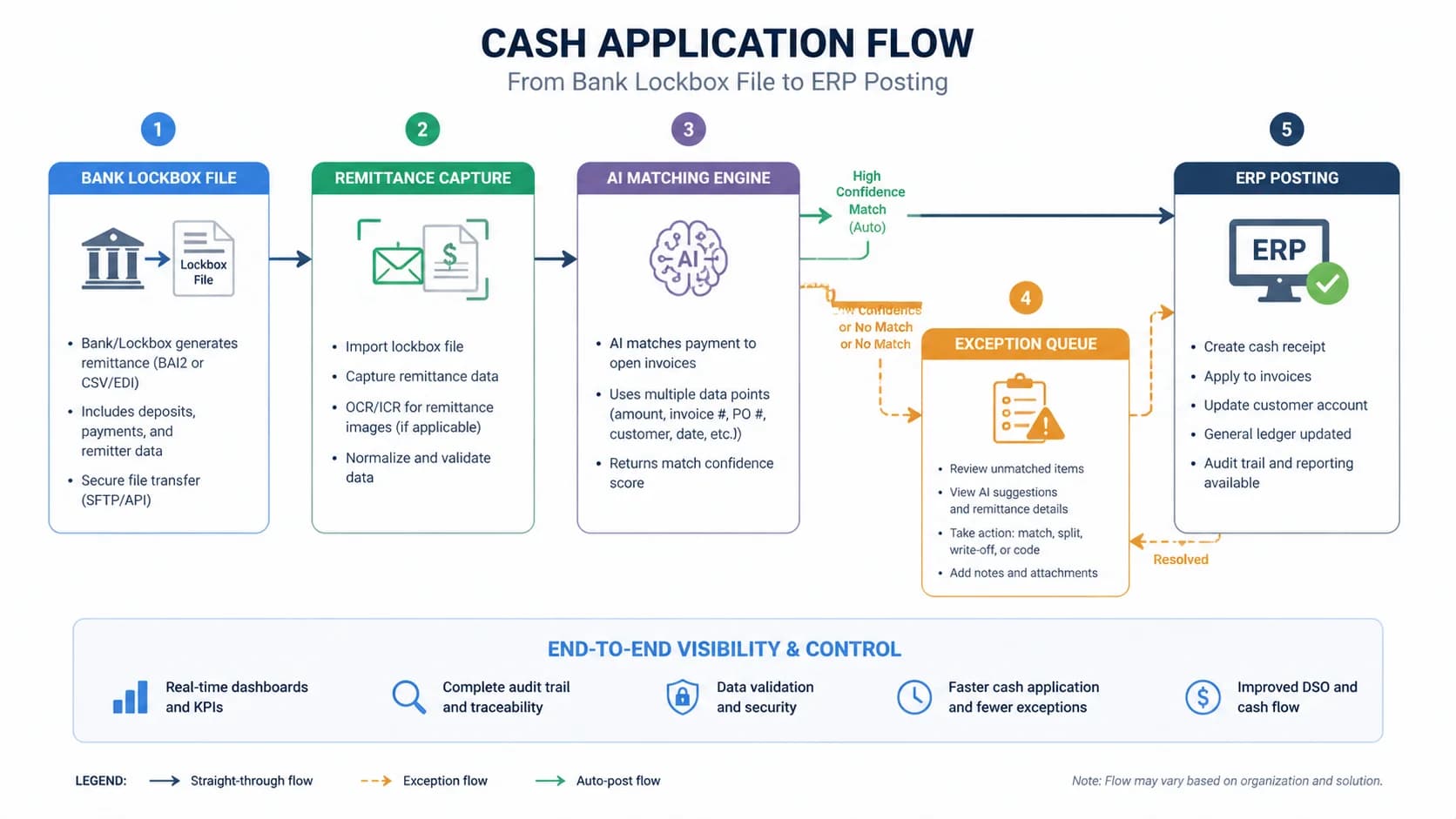
Strip away the marketing layer and cash application software does four things in sequence. First, it ingests the bank file or lockbox feed (BAI2, MT940, or direct lockbox). Second, it captures the remittance advice from wherever your customers send it: PDF email attachments, EDI 820 transactions, customer portals, or check stubs. Third, it matches the payment to one or more open invoices using AI and rule-based logic. Fourth, it writes the application back to your ERP and clears the receivable.
The terminology trips people up. Cash posting is the ERP-side act of debiting cash and crediting AR. Cash application is the upstream work of figuring out which invoice the cash belongs to. Most modern platforms do both, but a vendor that only posts (no matching intelligence) is a glorified ledger entry tool, not automation. If you are reading this guide as part of a [complete guide to AR automation](/blog/complete-guide-ar-automation) evaluation, the matching engine is the part that earns its keep.
What this software is not: a collections tool, a credit-decisioning engine, or a dispute-management workflow. Those live in adjacent AR modules. Cash application is the narrow, high-volume problem of getting payments matched and posted before the close clock runs out. The failure mode it eliminates is the unapplied-cash queue, the spreadsheet of payments your team cannot tie back to invoices that grows every Friday and blocks revenue recognition every month-end. Eliminate that queue and you have bought yourself the value the software promises.
- Define cash application vs. cash posting in one sentence
- Trace the end-to-end flow: bank file/lockbox -> remittance capture -> matching -> ERP post
- Note the failure mode it eliminates: unapplied cash blocking month-end close
- Distinguish from broader AR automation (collections, credit, dispute)
When you actually need it (and when ERP-native is enough)
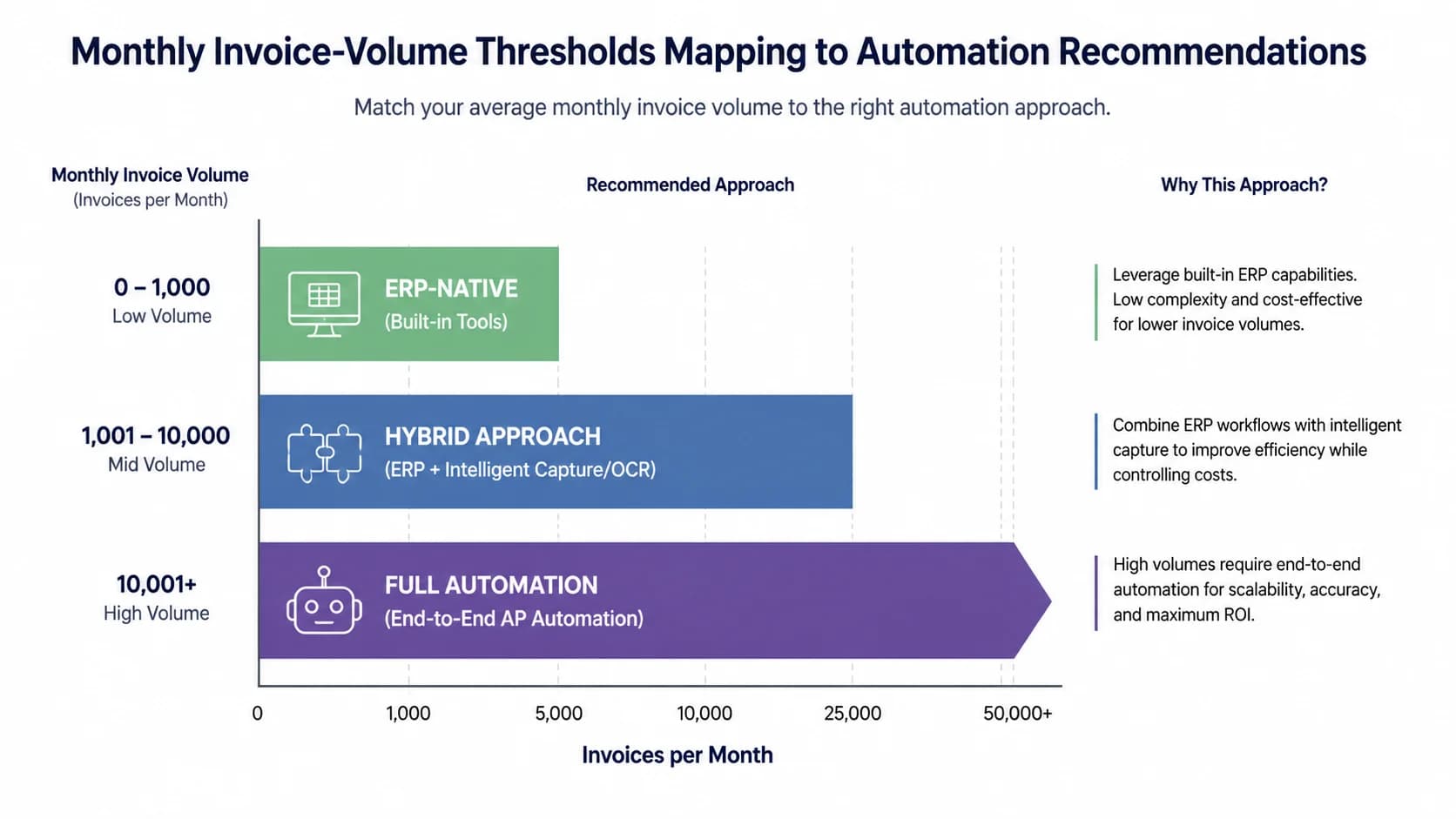
If you process under 200 invoices per month with mostly card payments, your ERP's native cash application is usually adequate. Above 500 monthly invoices with mixed payment methods or remittance-on-email, dedicated cash application software typically pays back inside 6 months.
Use volume as the first filter. Below 200 invoices a month, NetSuite, Sage Intacct, and QuickBooks Online all have native cash application that handles card-heavy or simple-ACH payment streams with reasonable accuracy. The clerk-time savings of dedicated software at that volume rarely cover the license. Between 200 and 500 invoices a month sits the evaluation zone: the math works if you have mixed payment methods, remittance-on-email, or seasonal spikes. Past 500 monthly invoices, especially with check and wire mixed in, the manual cost of $15-40 per invoice fully loaded becomes the loudest number on your operating P&L.
Volume is necessary but not sufficient. The real triggers are events. A merger that doubled your customer count overnight. A switch from a single bank lockbox to a multi-bank treasury setup. A large customer mandating you accept payment through their AP portal. The retirement or attrition of the senior AR clerk who held the matching tribal knowledge in her head. Any one of these turns a manageable manual process into an unscalable bottleneck, and that is when buying intent gets real.
Be honest about the inverse case. If 70% of your payments are card and your ERP already integrates with a card processor, dedicated cash application software is overkill. The dollars are better spent on collections automation or dispute-management, where the manual cost per touch is far higher. The fastest way to waste budget in 2026 is to automate a problem you do not have.
- Volume thresholds: <200/mo ERP native, 200-500/mo evaluate, 500+/mo automate
- Trigger events: M&A, lockbox switch, customer-portal mandate, AR clerk attrition
- Honest disclaimer that automation is overkill for low-volume shops
Pro Tip
If 70%+ of your payments are card and your ERP already has a card processor integration, dedicated cash application software adds little. Redirect that budget toward collections automation, where each manual touch costs more and the ROI compounds faster.
Skip the 9-month enterprise rollout
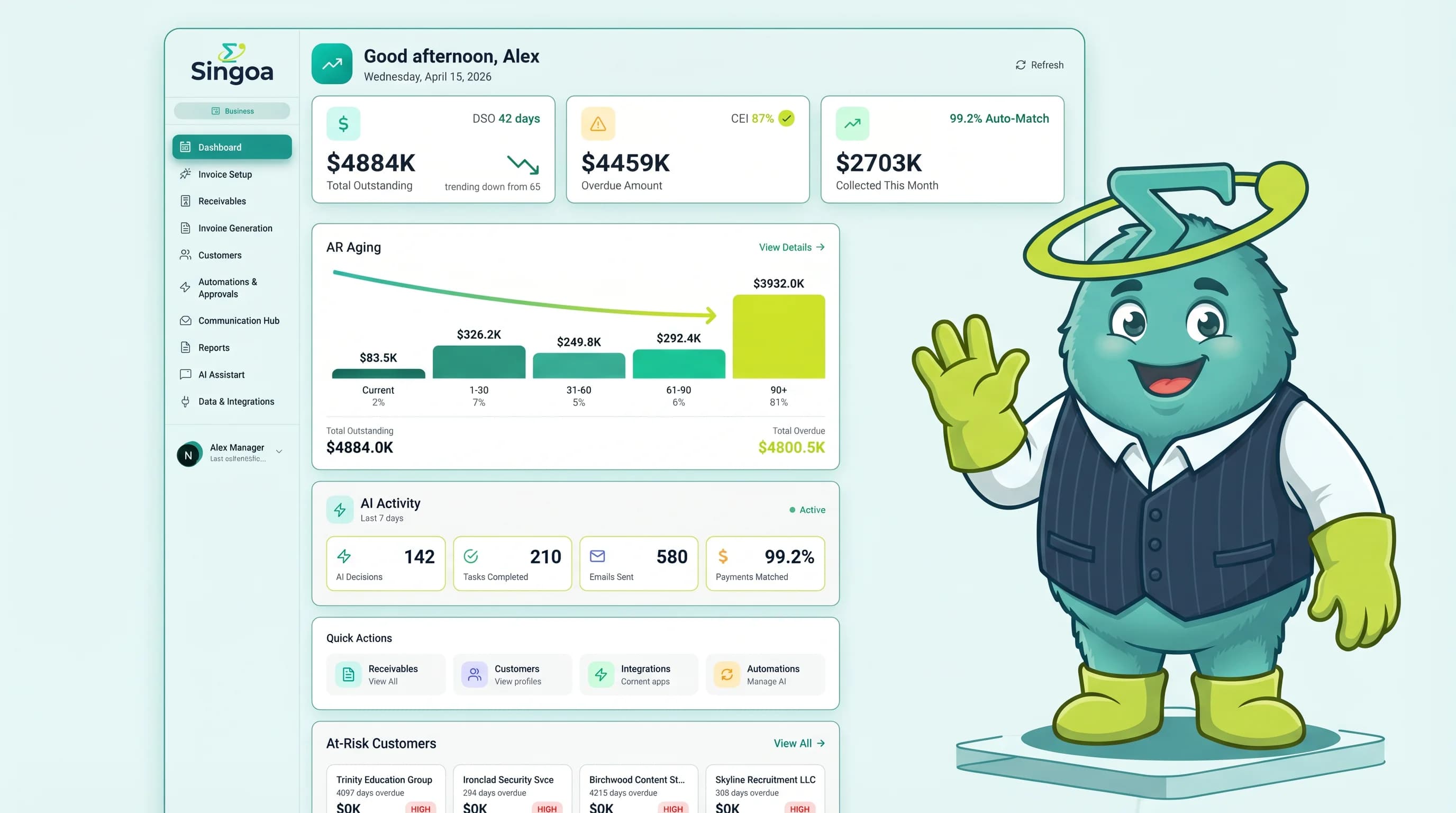
Mid-market AR teams using SINGOA hit 99.2% straight-through processing in 2-4 weeks at $1-3 per invoice. See the live product.
Core features to demand in 2026
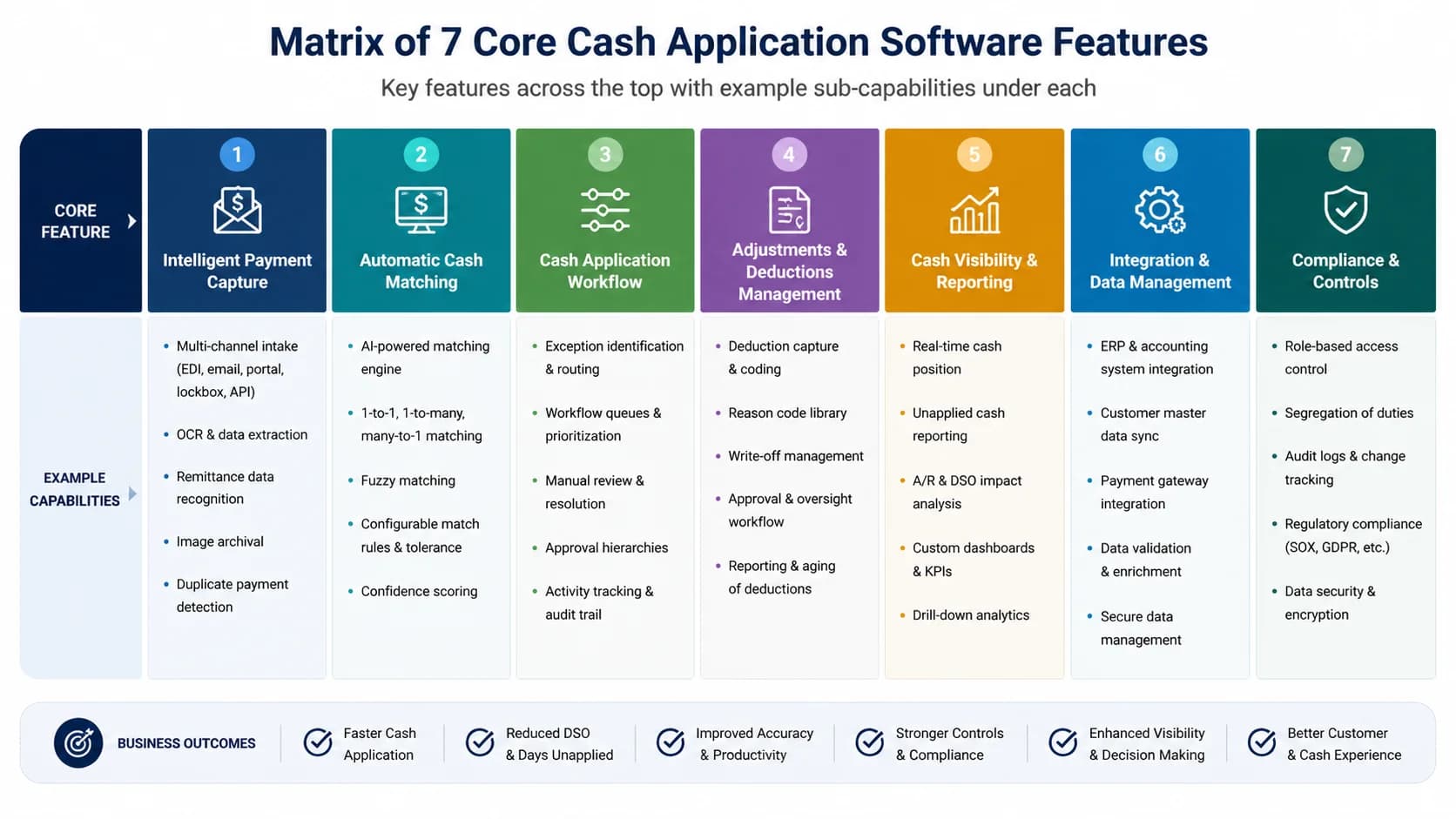
The seven non-negotiable features of modern cash application software are: AI invoice-to-payment matching, multi-format remittance capture (email, PDF, EDI 820, portal), bank-file ingestion (BAI2, MT940), exception workflow with reason codes, bidirectional ERP write-back, audit trail, and SOC 2 Type II certification.
AI matching is the headline feature, but the benchmark is what counts. Industry-standard straight-through processing rates run 90-95% for top platforms. Newer mid-market entrants report higher numbers; SINGOA platform data shows 99.2% on AI matching against mid-market remittance samples. Always compare apples to apples by demanding the vendor run STP on your sample data, not their best-customer benchmark. For deeper context, see the [AI payment matching accuracy benchmarks](/blog/ai-payment-matching-accuracy) post.
Remittance capture is where vendors quietly differentiate. Modern AR teams receive remittance through six channels: PDF email attachments, scanned check stubs, EDI 820 transactions, customer AP portals, web forms, and the occasional phone call your clerk types into a spreadsheet. Demand all six in a demo. If the vendor only handles bank-file remittance, you will still have a manual queue for every payment that arrives by email, which in mid-market is roughly 40% of volume. Bank-file ingestion should cover BAI2, MT940, and direct lockbox feeds.
The unglamorous features matter most at scale. Exception workflow needs reason codes (short-pay, deduction, unidentified payer, duplicate) and a one-click reroute to collections or disputes. ERP write-back must be bidirectional, not a CSV export your clerk re-imports manually. Audit trail must capture the full match-decision history for SOX and customer audit requests. SOC 2 Type II is table stakes. If a vendor is still showing you a SOC 2 Type I report or, worse, none at all, you have your answer about how mature their security operations actually are.
One more underrated capability: confidence-scored auto-match thresholds. Good platforms let you say match anything above 95% confidence automatically and route the rest to an exception queue. That single setting is the difference between trusting the system and double-checking every entry.
- AI/ML matching with named accuracy benchmark (industry: 90-95%, SINGOA: 99.2%)
- Multi-format remittance capture, list every format
- Bank-file ingestion (BAI2, MT940, lockbox)
- Exception queue with reason codes
- Bidirectional ERP write-back (not just CSV exports)
- Audit trail + SOC 2 Type II
The 8-criterion evaluation scorecard
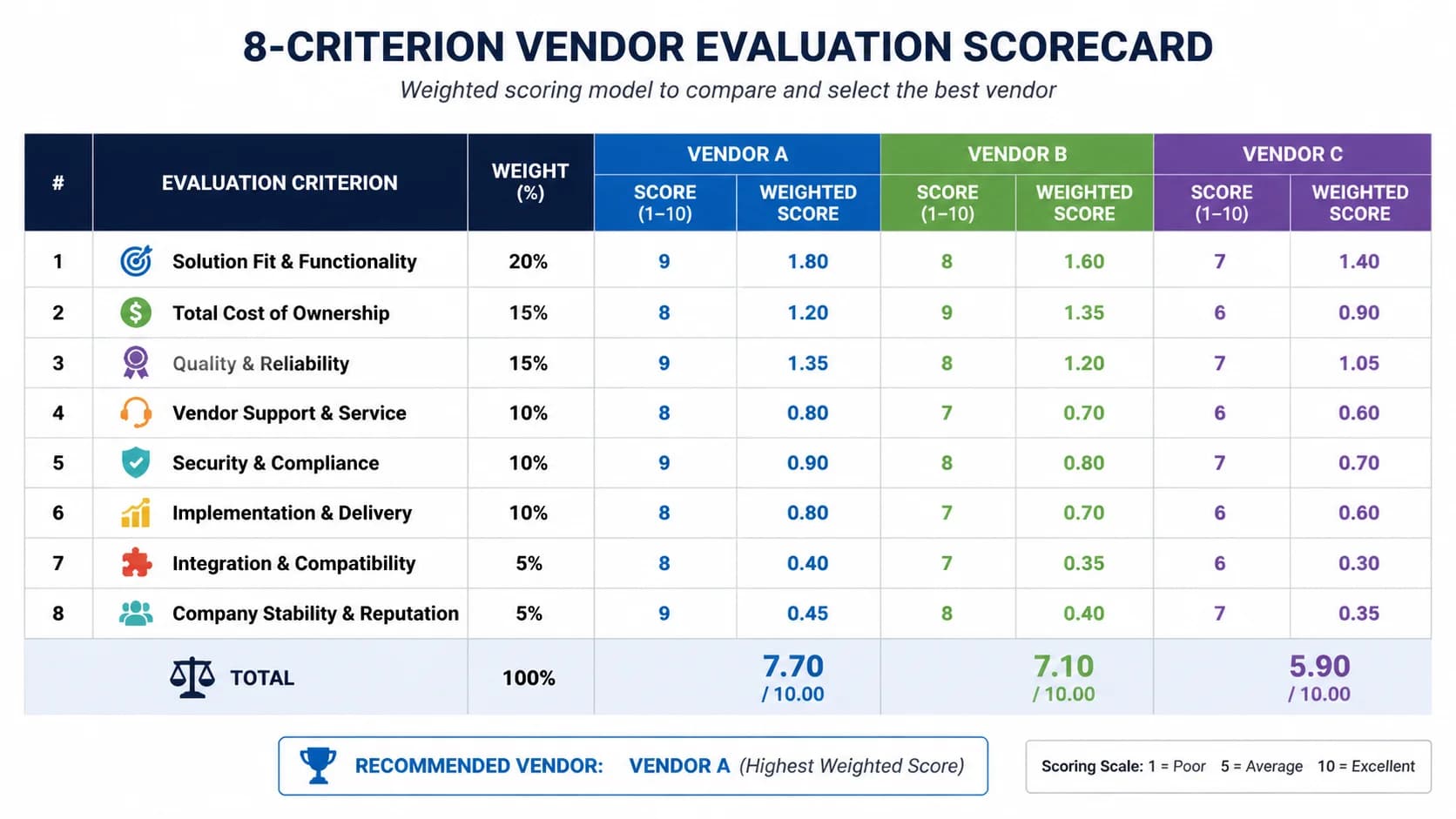
Score every cash application vendor on eight weighted criteria: STP rate (20%), ERP fit (15%), implementation time (15%), total cost (15%), exception UX (10%), security (10%), customer support (10%), product roadmap (5%). Anything scoring below 70 out of 100 should not advance to contract.
STP rate (20%) is the single most important criterion because it is the metric every other ROI number derives from. Good looks like 95%+ measured on your sample remittance data with no rule pre-tuning. ERP fit (15%) covers native connectors versus middleware. NetSuite, Sage Intacct, Microsoft Dynamics 365, SAP S/4HANA, and Oracle Fusion should appear as named integrations with documented field mappings. If your ERP needs an iPaaS layer or a custom build, lower the score one full grade.
Implementation time (15%) and total cost (15%) move together. A vendor offering 2-4 week mid-market deployment at $1-3 per invoice scores top of the band. A 6-12 month enterprise rollout at $200K license can still score well if your volume is over 30,000 monthly invoices and you have IT resources. Exception UX (10%) is best evaluated by clicking through the exception queue yourself. Look for keyboard-first workflows, in-context customer history, and one-click reassignment to collections.
Security (10%) means SOC 2 Type II current within 12 months, encryption at rest and in transit, role-based access controls, and SAML SSO. Customer support (10%) is best diced into two questions: what is the named CSM ratio, and what is the response SLA on a P1 production issue. Roadmap (5%) gets the smallest weight on purpose; it matters but it is the easiest claim to inflate.
Build a worked scorecard with three vendors. Vendor A scores 88 (STP 19, ERP 13, implementation 14, cost 12, exception 9, security 10, support 8, roadmap 3). Vendor B scores 64 and drops out. Vendor C scores 81. The exercise takes a half day and gives your CFO a defensible decision artifact. Copy this scorecard into your RFP, change the weights only if your priorities genuinely differ, and you have built an objective filter that survives any single demo's charisma.
The scorecard is also your insurance policy against vendor lock-in panic six months in.
- Walk through all 8 criteria with weight + 'what good looks like'
- Show a worked scorecard with three anonymized vendors
- Tell readers to copy this into their RFP
Pro Tip
Weight STP rate higher than the vendor's marketing claim. Ask for STP measured on your sample remittance data during the trial, not their best-customer benchmark, and require them to share the raw match-confidence distribution.
Pricing models compared: per-invoice vs license vs hybrid
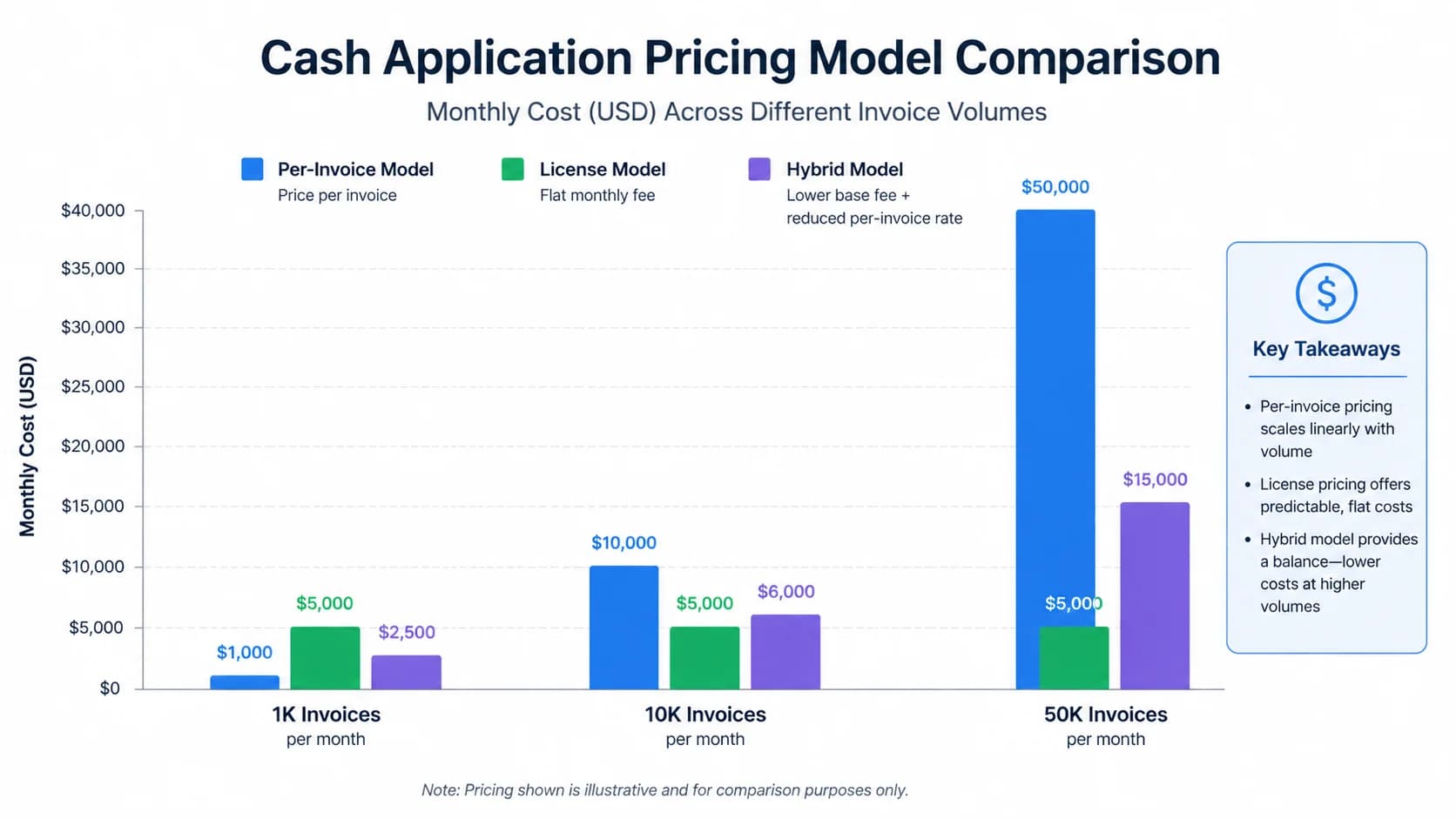
Cash application software follows three pricing models: per-invoice ($1-3 per matched invoice, mid-market), annual license ($50K-$500K, enterprise), and hybrid (base platform fee plus a volume tier). Per-invoice scales linearly with volume and is typically cheapest below 30,000 invoices per month.
Per-invoice pricing is the mid-market default because it tracks the value delivered. At [$1-3 per invoice pricing](/pricing), a team processing 1,500 monthly invoices spends $1,500-$4,500 a month, predictable and budget-defensible. The model becomes less attractive past about 30,000 monthly invoices, where the linear curve crosses the flat license. The advantage is that you only pay when the software actually matches a payment; the disadvantage is that high-growth months produce variable bills your CFO has to forecast.
Annual license pricing dominates the enterprise tier. HighRadius, Billtrust, and BlackLine typically quote $50,000 to $500,000 a year depending on volume bands and modules. The math works only at scale: at 50,000 monthly invoices, a $250,000 license is roughly $0.42 per invoice, well below per-invoice rates. Below 10,000 monthly invoices, you are subsidizing the vendor's enterprise sales motion. Watch the ramp clauses; many license contracts include 7-12% annual escalators that compound silently.
Hybrid pricing sounds reasonable until you read the volume tiers. A base platform fee of $40,000 plus tiered overage starts cheap, but the cliff between tiers (for example, $0.80 per invoice from 0-20K, then $1.40 per invoice from 20-30K) can swing your annual cost 25% on a normal seasonal spike. Always model two years of forecast volume against the tier table before signing.
Anchor every pricing conversation to the manual baseline. Fully loaded manual cash application costs $15-40 per invoice (clerk salary, benefits, error rework, delayed close penalties). Even at the high end of $3 per invoice automated, you are looking at an 80%+ unit-cost reduction. At those numbers, any of the three models pays back inside 12 months for teams above the 500-invoice threshold.
- Per-invoice ($1-3): mid-market favorite, predictable
- License ($50K-$500K): enterprise, ROI requires high volume
- Hybrid: base + tiered, watch for overage cliffs
- Manual cost benchmark: $15-40/invoice fully loaded, automation pays back in <12 months at any model
Implementation timelines: 2 weeks vs 9 months
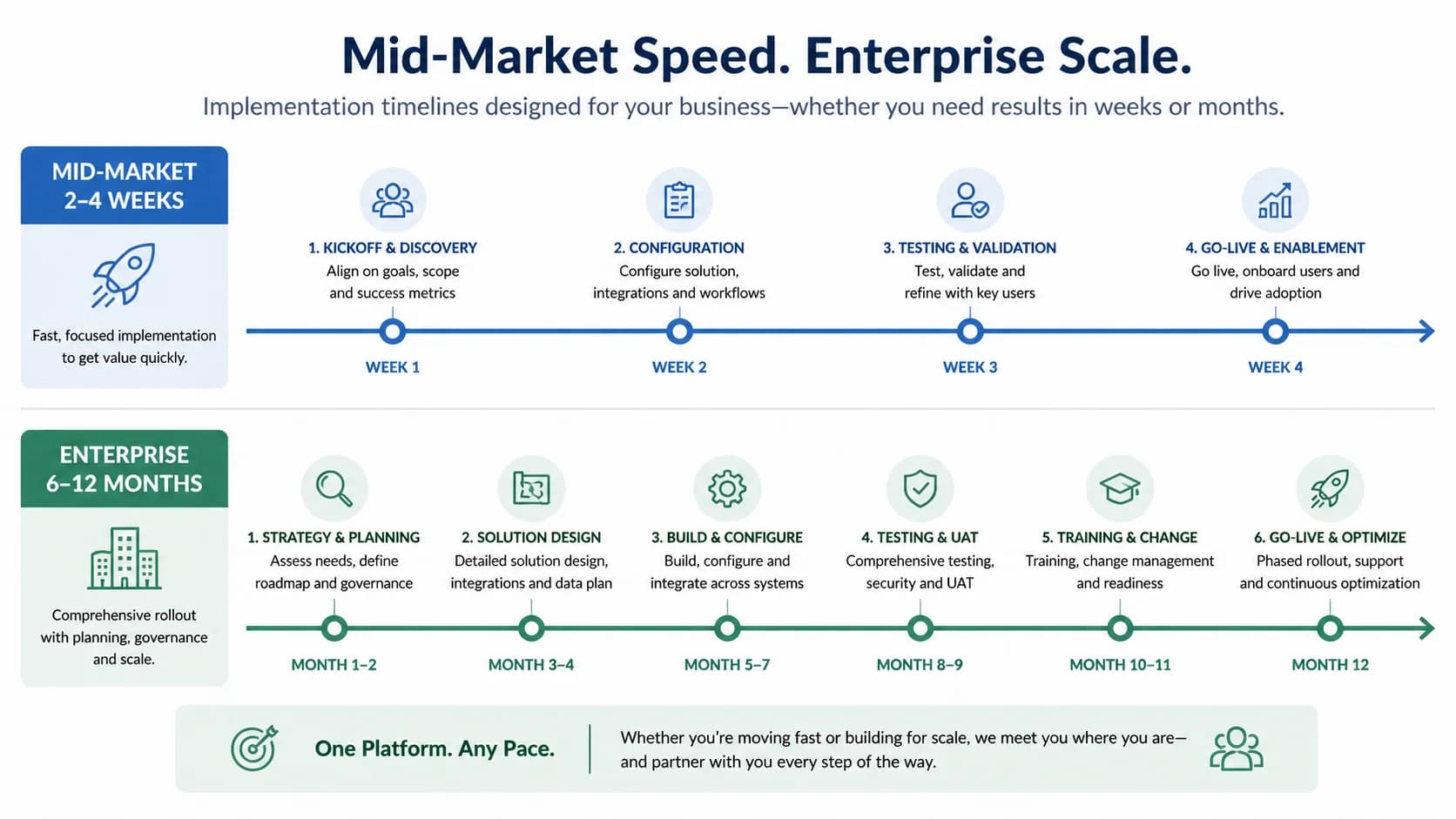
Mid-market cash application software typically goes live in 2-4 weeks. Enterprise platforms like HighRadius and Billtrust average 6-12 months because of professional-services-led ERP integration, custom workflow scoping, and stage-gated UAT. The gap is structural, not optional.
A mid-market deployment fits in a single sprint cycle. Week 1 wires up the ERP connector, ingests a 90-day sample of historical remittances, and trains the matching model on your customer master and invoice patterns. Week 2 runs parallel matching against live volume, with your AR lead reviewing the exception queue and signing off on confidence thresholds. Weeks 3 and 4 cut over to production with the vendor on call. By day 30 your clerks are working out of the exception queue instead of a spreadsheet.
Enterprise rollouts run on a different clock. Discovery alone takes 4-8 weeks, build runs another 8-12 weeks for ERP customization, then UAT, parallel run, and phased go-live across business units consume the rest of the year. Each stage gate exists for legitimate reasons (multi-entity consolidation, custom EDI partners, complex audit requirements), but the cost is delayed time-to-value and 6-12 months of dual-system carrying expense.
Watch for vendors disguising a 6-month timeline as 8 weeks. The tell is in the statement of work: if the SOW lists discovery, design, build, test, and go-live as separate phases without named dates, you are looking at a 6-month rollout with optimistic kickoff language. Ask for the named project-manager headcount in writing, the date your AR team can actually log in, and a written go-live milestone with penalty clauses for slippage. Without those, the 8-week claim is marketing copy. The right question is not how fast can you deploy, but when does my team stop touching spreadsheets.
- What gets done in week 1 vs week 4 for mid-market
- Enterprise stage gates: discovery, build, UAT, parallel run
- How to detect a vendor disguising a 6-month timeline as '8 weeks'
Pro Tip
Ask for the named project-manager headcount in writing. Self-serve implementations from enterprise vendors usually mean an unstaffed Slack channel, a clear sign the timeline will slip past quarter end.
Top vendors at a glance: HighRadius, Billtrust, Versapay, Esker, BlackLine, SINGOA
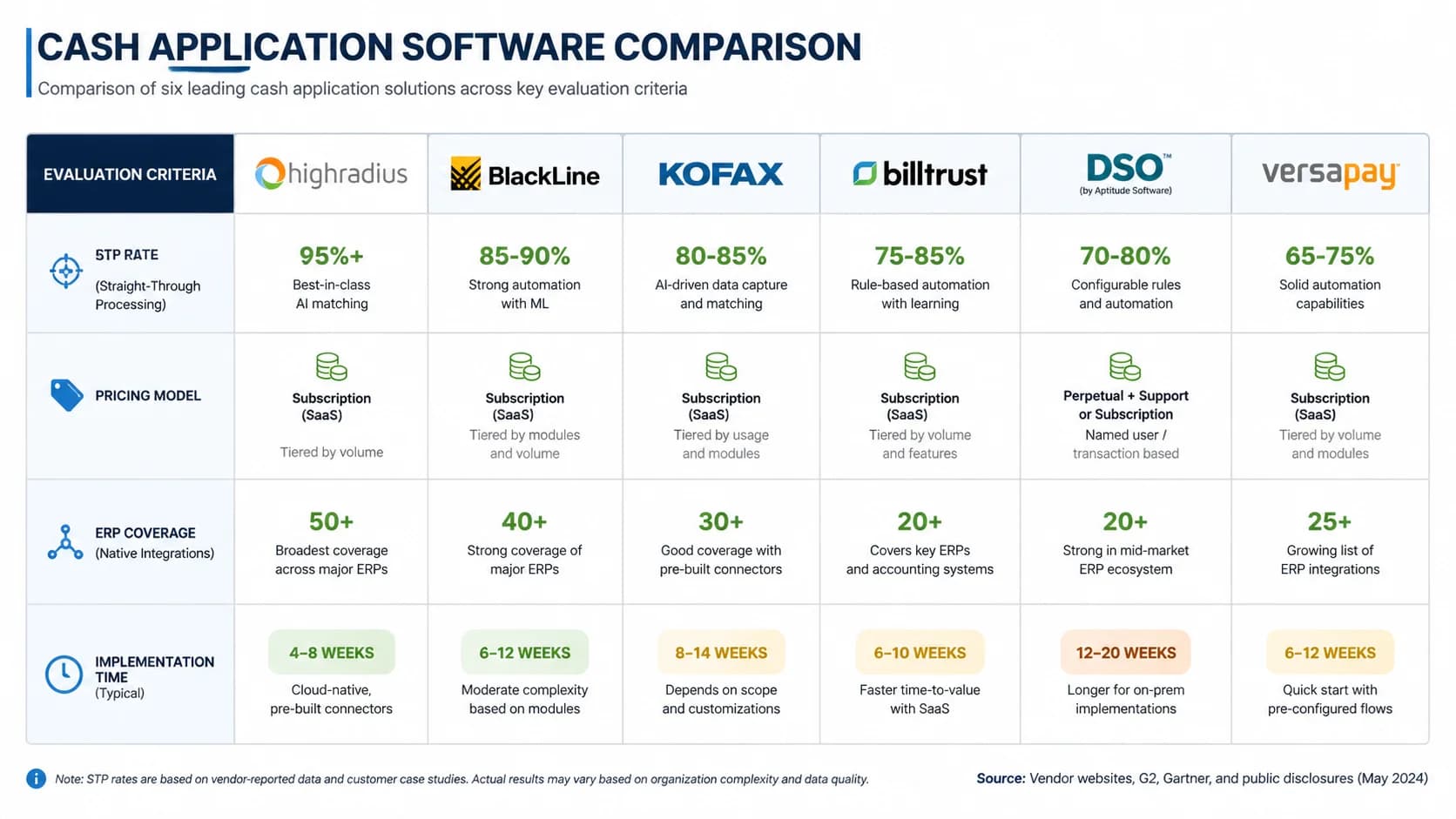
Six cash application platforms cover the 2026 buyer landscape: HighRadius (enterprise, AI-first), Billtrust (omnichannel B2B), Versapay (collaborative AR), Esker (procure-to-cash), BlackLine (close-focused), and SINGOA (mid-market AI-native). Each fits a different revenue band and ERP profile.
HighRadius is the enterprise default for $1B+ revenue companies on SAP or Oracle. Their AI matching is mature, their professional services bench is deep, and their pricing reflects both. Expect $200K-$500K annual license, 6-9 month implementation, and a sales cycle that involves three named executives. Billtrust competes head-on with HighRadius and adds stronger omnichannel B2B payment acceptance, useful if you are also modernizing your invoice-presentment side. Versapay takes a different angle: collaborative AR portals where customers self-serve remittance, which lifts STP if your buyers will use the portal.
Esker bundles cash application inside a broader procure-to-cash suite, so it appeals to teams unifying AR and AP under one vendor. BlackLine's strength is close orchestration; their cash application module fits naturally if you already run BlackLine for reconciliations and journal entry. The trade-off across all four enterprise players: capability is genuine, but the buying motion, implementation length, and total cost assume you have the infrastructure of a $500M+ company. For deeper comparison on one of these head-to-head, see [SINGOA vs HighRadius head-to-head](/blog/singoa-vs-highradius-2026).
SINGOA targets the mid-market gap directly. AI-native matching reports 99.2% STP on platform data, native connectors to NetSuite, Sage Intacct, QuickBooks Online, and Microsoft Dynamics 365, $1-3 per-invoice pricing with no license commitment, and 2-4 week implementation with no professional-services engagement required. The trade-off honest buyers should weigh: SINGOA does not yet have the multi-entity consolidation depth that a $2B SAP customer needs, and the partner ecosystem is younger than HighRadius. If you are between $5M and $500M revenue and want to be in production this quarter, that is the right trade.
The vendor comparison table belongs in your RFP appendix. STP claim, named ERP integrations, pricing model, implementation time, SOC 2 status, and contract minimum. Anything a vendor will not put in writing for that table belongs in the red flags column.
- Two-line profile per vendor
- Best-fit segment per vendor
- Comparison table: STP claim, pricing model, ERPs, implementation time
Red flags that should disqualify a vendor
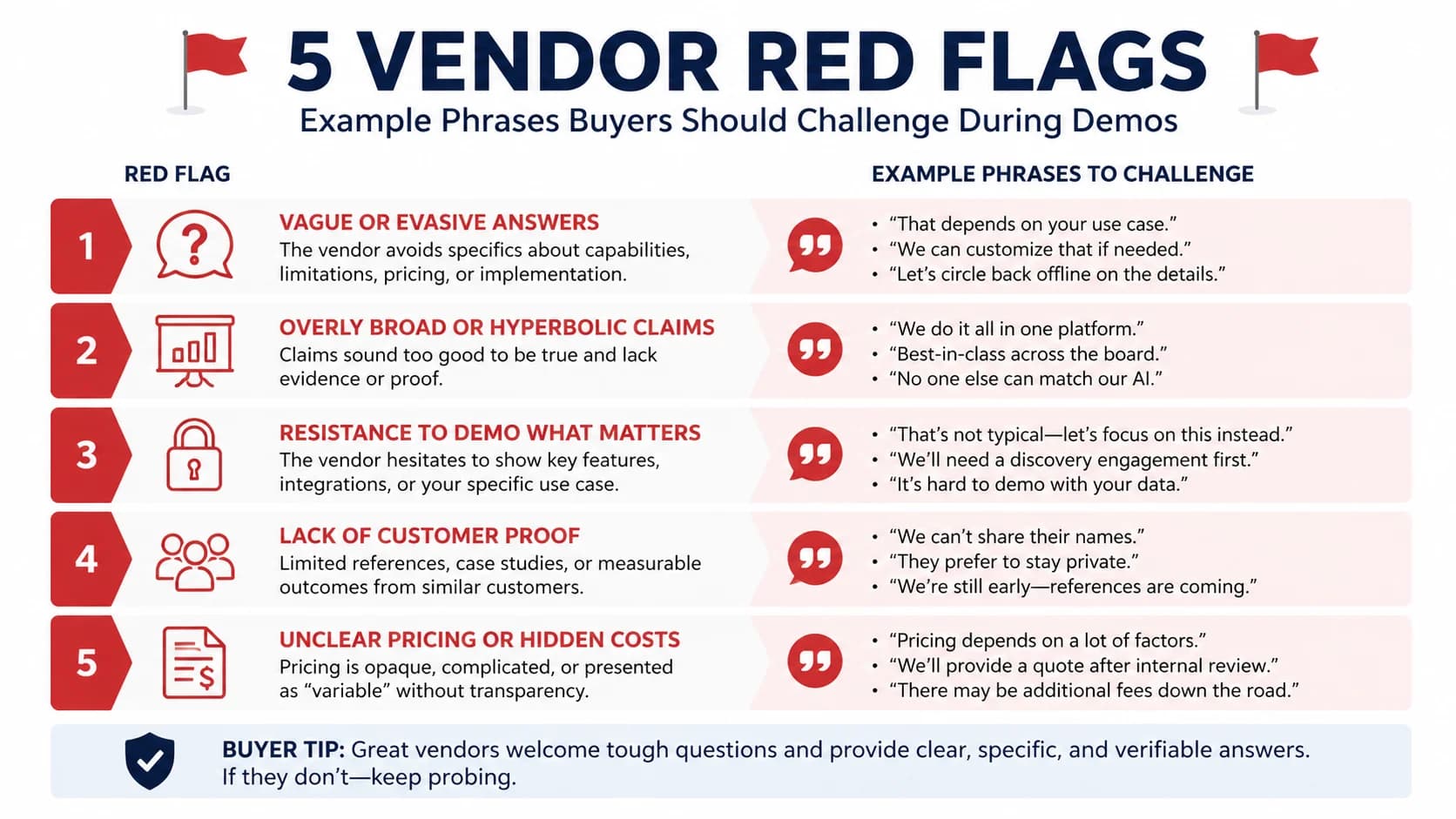
Disqualify any cash application vendor that refuses to share STP measured on your data, charges separately for ERP write-back, lacks SOC 2 Type II, or mandates a 12-month contract before a paid pilot. These five red flags signal vendor risk that no demo can offset.
First red flag: an STP rate quoted with no methodology. If a vendor says 95% but cannot tell you the denominator (matched invoices? matched payment lines? net of pre-tuned rules?), the number is marketing copy. Demand the calculation, demand the dataset, and demand a measurement on your sample data during the trial. Second red flag: ERP write-back as a paid add-on. Cash application without bidirectional ERP write-back is not automation, it is a CSV export. If the vendor itemizes write-back as a separate SKU, the base product is incomplete.
Third red flag: no SOC 2 Type II certification, current within 12 months. SOC 2 Type I is a point-in-time audit and is not enough for a system handling cash. Fourth red flag: a 12-month minimum contract with no paid pilot option. Confident vendors run 60-90 day paid pilots against your real volume because they win on results. Mandatory annual contracts before a single match runs are a sign the vendor is protecting against early churn. Fifth red flag: implementation only via the vendor's professional services team, with no self-serve option, even when your team has the technical capability. That structure exists to inflate services revenue, not to make you successful.
Take any one of these red flags as a yellow card. Two or more is a disqualification. The deeper context for why these patterns persist is in our [the $47B manual AR problem](/blog/47-billion-ar-problem-manual-invoice-processing) breakdown.
The hard part of buying cash application software in 2026 is not finding vendors. The hard part is filtering signal from pitch deck. Use the volume threshold first (do not automate below 200 monthly invoices), apply the eight-criterion scorecard second, run STP on your own remittance data third, and reject any vendor that fails the five red-flag tests. That sequence converts a six-month evaluation into a six-week one and gives your CFO a defensible decision artifact.
The economics are forgiving. Manual cash application costs $15-40 per invoice fully loaded; automated matching costs $1-3. Even a vendor that scores 75 out of 100 on your scorecard will pay back inside 12 months at typical mid-market volume. The risk is not picking a slightly imperfect tool; the risk is letting another quarter close with 30% of incoming cash sitting in a suspense account while your AR clerk works the spreadsheet at 9 PM.
Whichever vendor you shortlist, insist on a paid pilot against your real remittance data before signing an annual contract. The 60 days you spend pressure-testing one vendor on your invoices teaches you more than reading another ten buyer's guides. Now go run the scorecard.
- STP claim with no methodology
- ERP write-back as paid add-on
- No SOC 2 Type II
- 12-month minimum, no pilot
- Implementation requires their PS team only (no self-serve option)