
Quick Answer
Automated bank reconciliation uses direct bank feeds and AI matching to clear 99%+ of transactions against your ledger continuously, replacing a 2-3 day month-end crunch with a daily checkpoint and cutting manual reconciliation time 70-80%.
Key Takeaways
- AI bank reconciliation hits 99%+ straight-through match rates by scoring remittance text, amount, date, and counterparty together.
- The real shift is workflow, not software: continuous daily posting removes 2-3 days from a typical 8-12 day close.
- Direct bank feeds and ERP sync (NetSuite, Sage Intacct, QuickBooks, SAP) are required; CSV uploads keep you stuck in batch mode.
- Exceptions stay human: 1-5% of transactions route to a queue with suggested matches, where staff resolve them in minutes.
- Mid-market teams report 70-80% reduction in manual reconciliation hours and closes shrinking from 8-12 days to 3-5 days.
See what you would save on close
Plug in your invoice volume and current close cycle to see the staff hours and working-capital lift continuous reconciliation unlocks for your team.
Why month-end reconciliation still feels like a crunch
It is 9 PM on day eight of close. Two staff accountants are still tying out three bank accounts against the general ledger, hunting a $4,217 variance that turned out to be a duplicated ACH from a customer who paid twice. The CFO has already pinged twice asking when she can see the cash position. This scene plays out in roughly 68% of mid-market finance teams every month, and for one reason: bank reconciliation is still treated as a month-end event.
It does not have to be. Automated bank reconciliation, as the technology actually works in 2026, clears 99%+ of bank transactions against the ledger continuously throughout the month. The 2-3 day crunch shrinks to a daily 15-minute checkpoint. The CFO sees cash position on demand. The variance hunt becomes a queue of three exceptions, not 300.
The shift sounds like a software upgrade. It is actually a workflow change, and the controllers who get the most out of it understand the difference. This guide walks through what automated bank reconciliation is, how AI matching reaches 99%+ accuracy, what bank feeds and ERP integrations actually look like, and the five-step path teams take to leave batch reconciliation behind for good.
If you are a controller, VP of Accounting, or AR manager evaluating tools, you will leave with a mental model you can forward to your CFO and a clear sense of what to ask vendors before you shortlist.
What automated bank reconciliation actually is
Automated bank reconciliation uses direct bank feed integrations and AI matching to compare bank statement transactions against ledger entries continuously, replacing the manual month-end check. The system pulls transactions several times daily, scores each one against open ledger items, posts confident matches automatically, and routes the rest to an exception queue for human review.
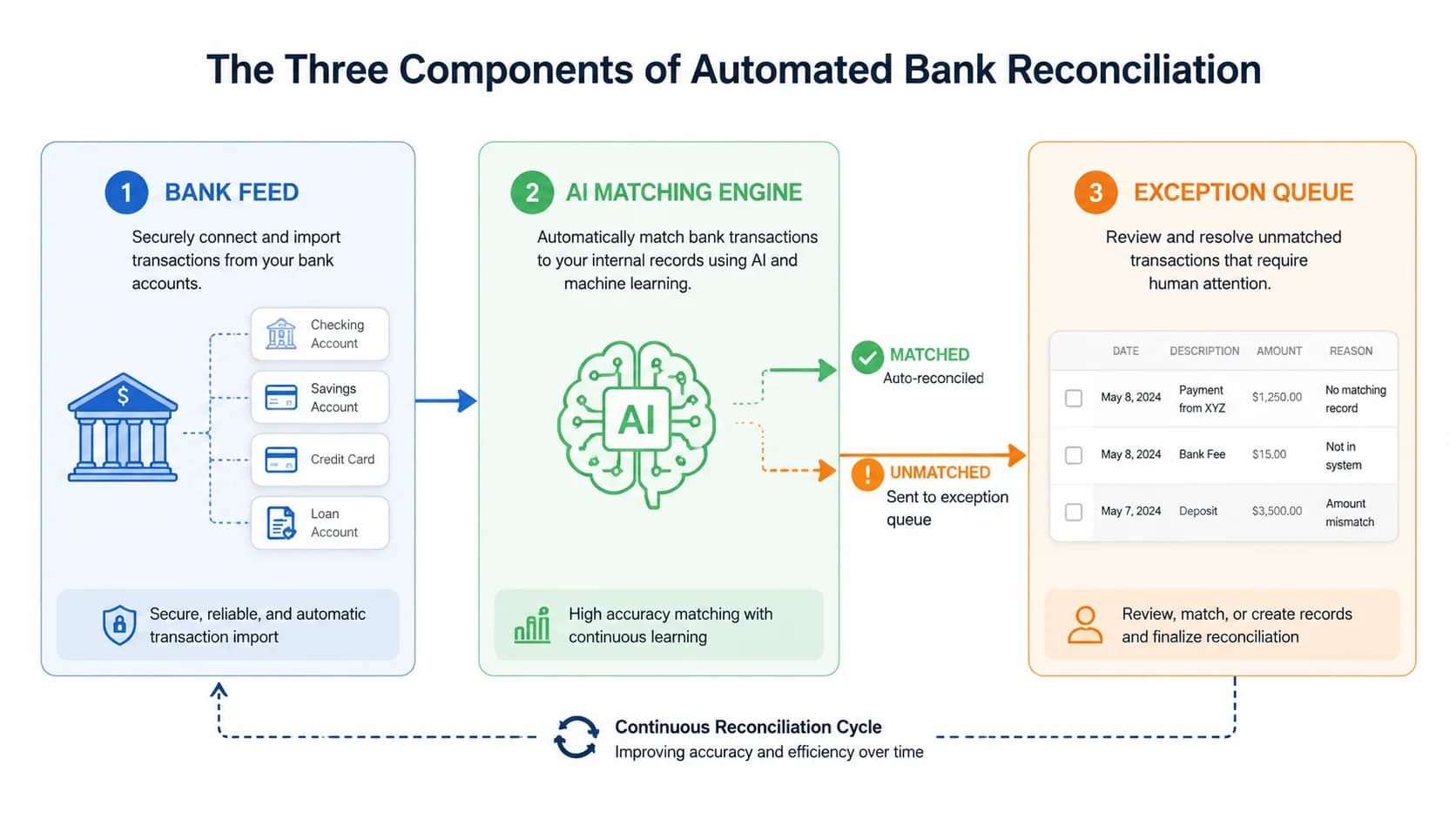
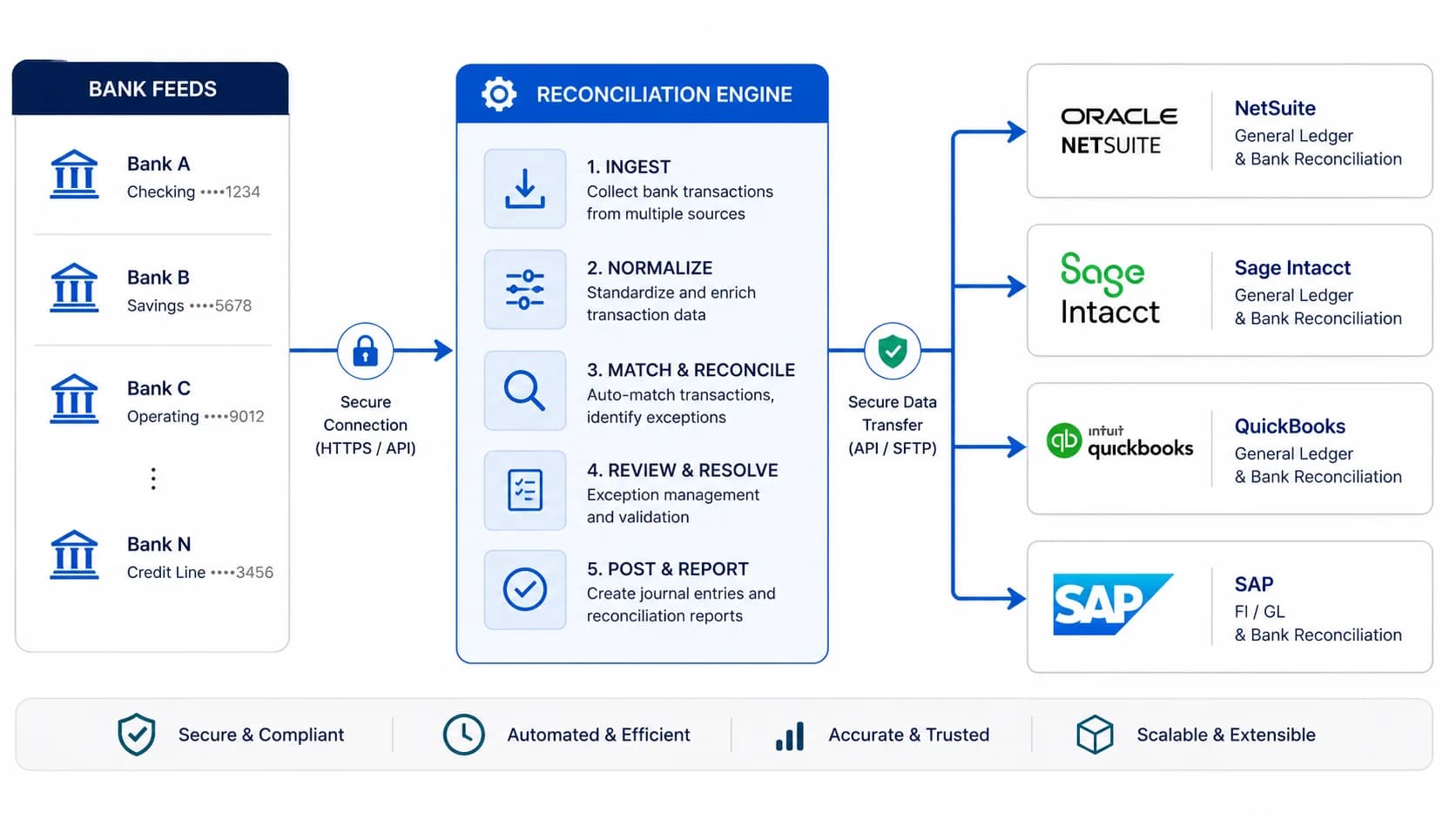
Strip away the marketing language and the technology has three components. First, a bank feed: a live connection (host-to-host, Plaid, Yodlee, or direct API) that pulls cleared transactions from every bank account several times a day. Second, an AI matching engine: a model that reads each incoming transaction and scores its fit against open invoices, deposits, and journal entries in your ERP. Third, an exception queue: the small slice of transactions the engine could not auto-clear, surfaced with suggested matches for staff to resolve.
The piece controllers tend to underestimate is how much of the value comes from the cadence change, not the AI itself. When transactions hit the ledger within hours of clearing the bank, every downstream task (cash forecasting, AR aging, intercompany sweeps) starts running on near-real-time data. That is a different finance operation than the one most mid-market teams have today, and it is why this topic shows up in our [complete guide to AR automation](/blog/complete-guide-ar-automation) under workflow design rather than under tooling.
Confusing automated bank reconciliation with generic close automation is common. Close automation orchestrates checklists and approvals across the whole period. Automated bank reconciliation does one thing well: matching cleared bank activity to the ledger. Get the second one right and the first one gets shorter on its own.
Reconciliation that actually clears 99%+
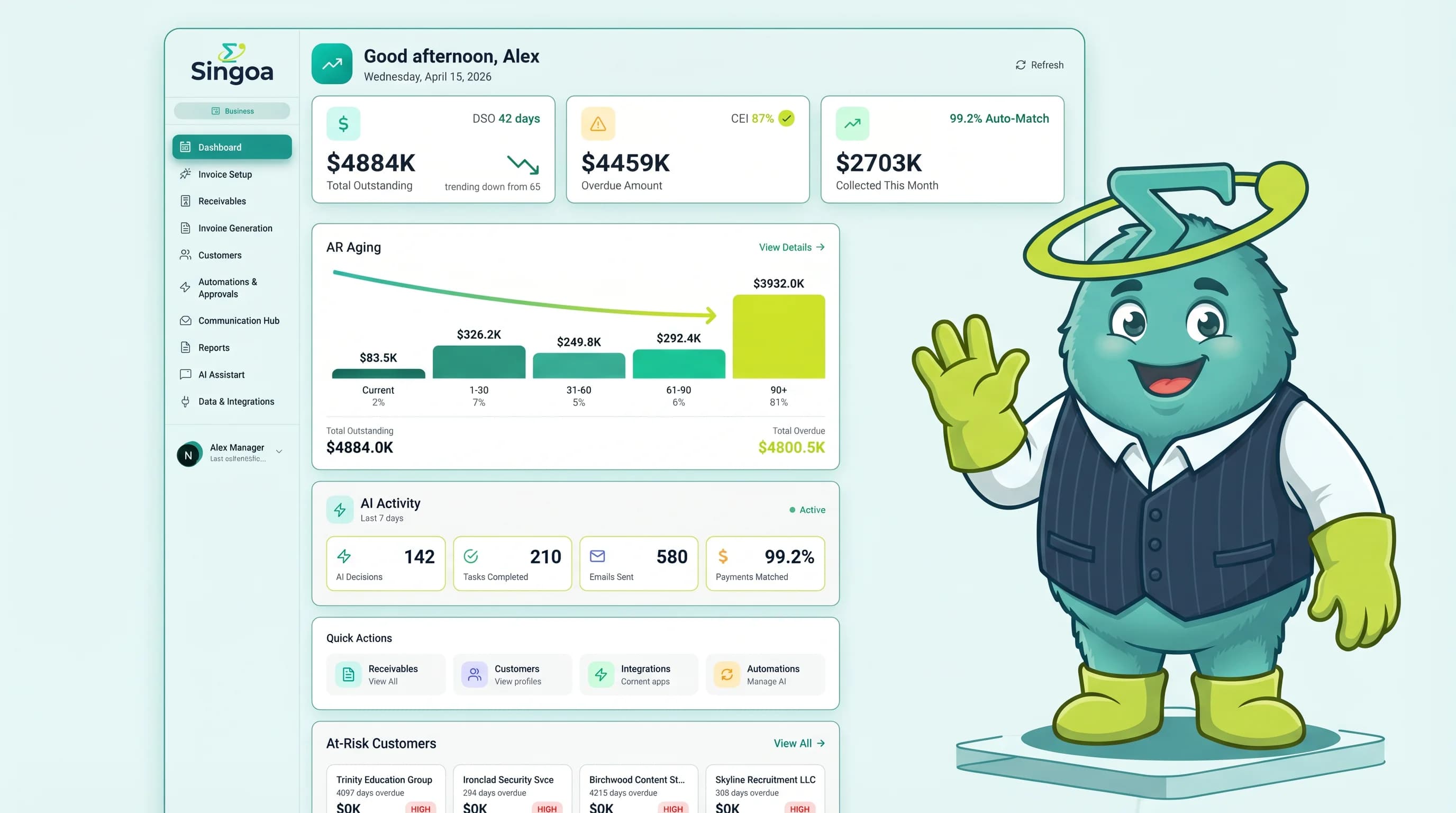
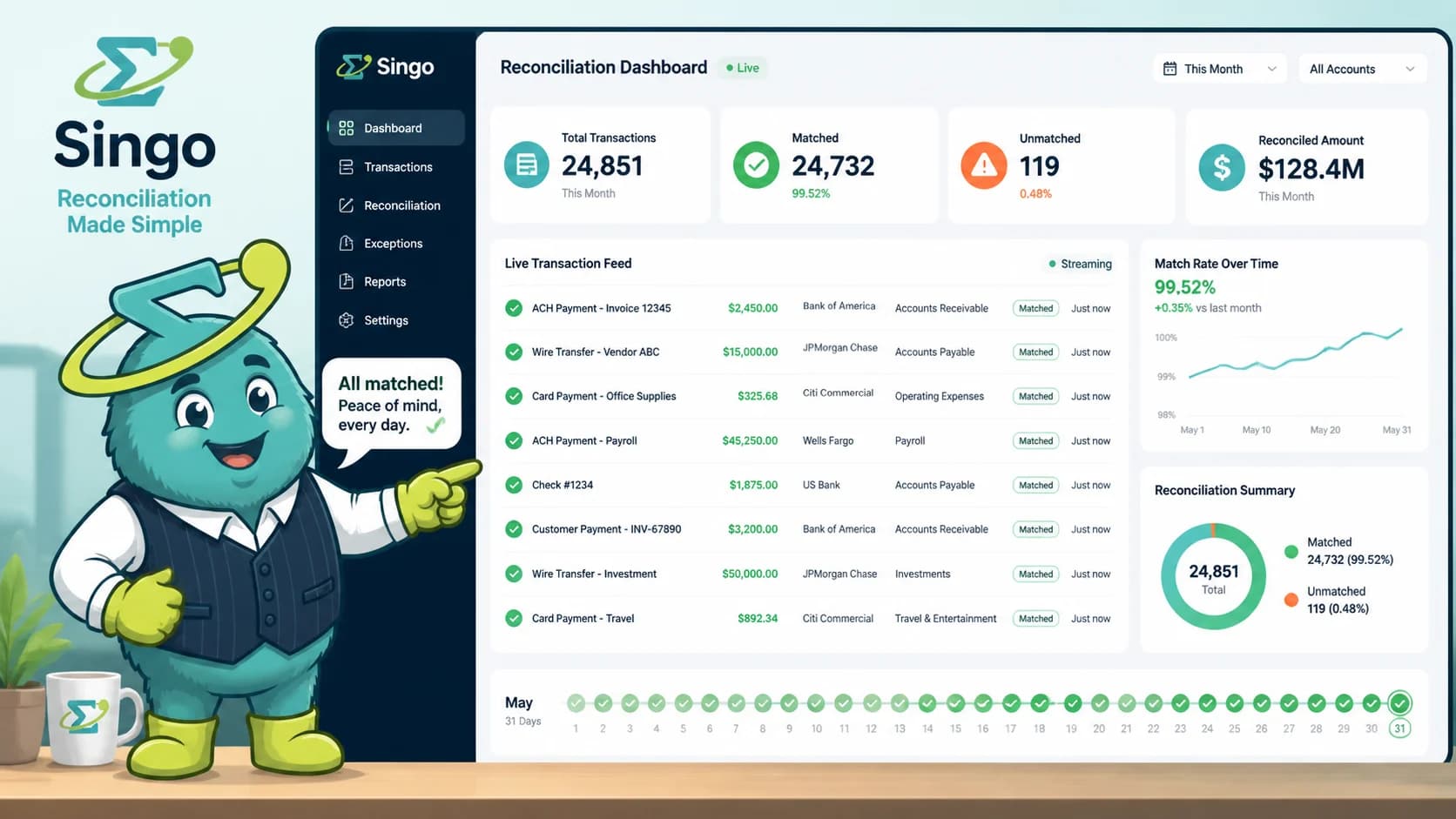
SINGOA's payment matching engine powers AR cash application and bank reconciliation on the same model. See how it handles your exception edge cases.
Why month-end reconciliation is the wrong unit of work
Mid-market controllers spend 2-3 days each period reconciling bank accounts because transactions accumulate untouched between closes. Continuous posting eliminates that backlog by clearing transactions daily, so close becomes a review of exceptions rather than a from-scratch reconstruction of the month.
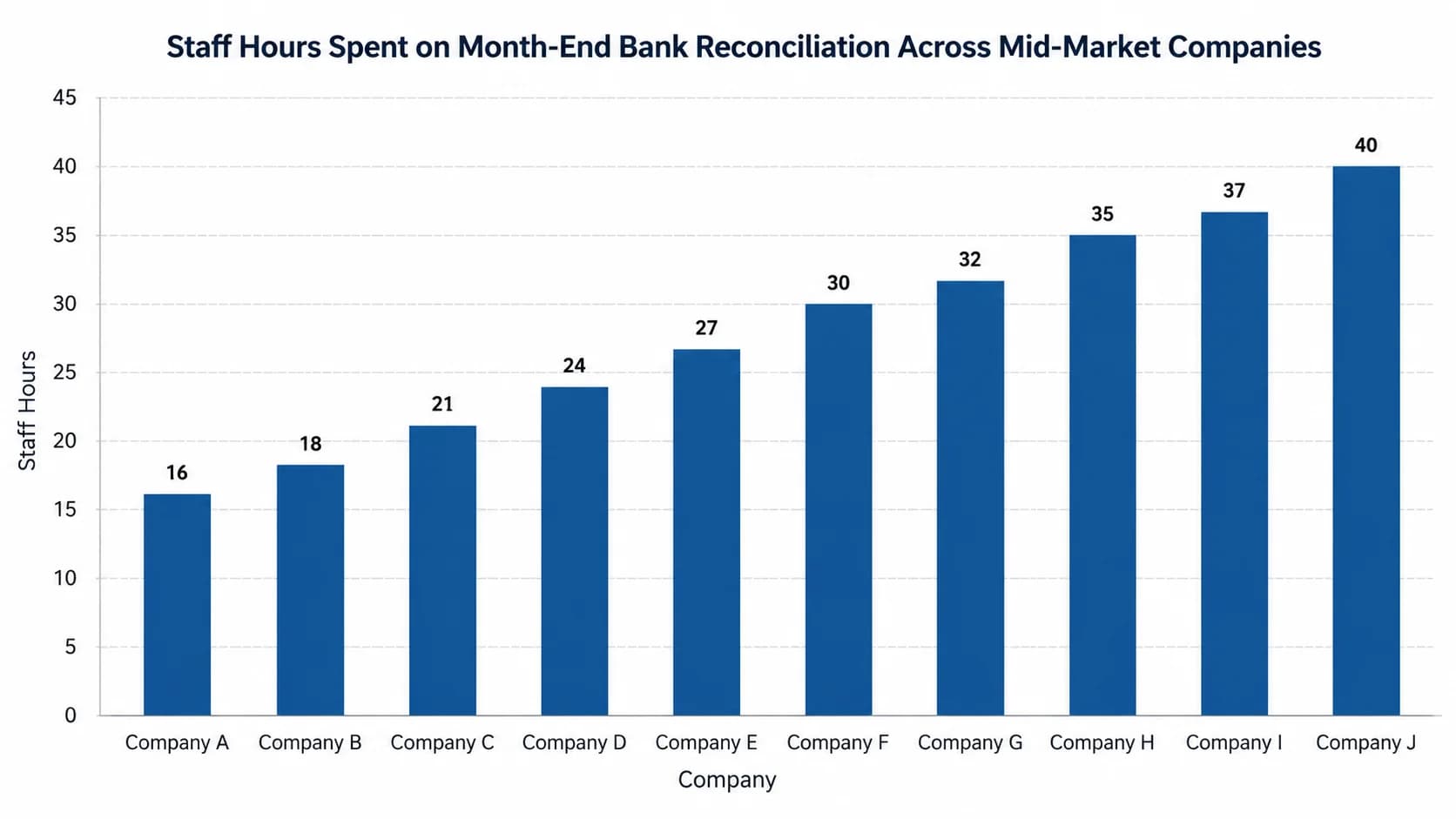
The math on batch reconciliation gets ugly fast. A $50M wholesaler running 4,000 monthly transactions across three bank accounts will burn 16-40 staff hours per close, depending on volume mix and how many duplicate or partial payments need investigation. AFP treasury surveys consistently put mid-market month-end close cycles at 8-12 days, and reconciliation is the single biggest contributor inside that window. The cost shows up twice: in staff time and in the working-capital decisions you cannot make until the books are clean.
The per-transaction economics are equally lopsided. Manual cash application and bank reconciliation cost roughly $15-40 per invoice when you load fully burdened staff time and error-correction overhead. Automated workflows on platforms priced at [$1-3 per invoice](/pricing) post the same transactions for a fraction of that. The savings are real, but they understate the real win, which is what your team does with the reclaimed days. Most controllers redirect that capacity into [scaling AR operations without adding headcount](/blog/scale-ar-operations-without-adding-headcount), not into a smaller team.
The deeper problem is that batch reconciliation gets worse as you grow. Double the transaction volume and your backlog more than doubles, because exception rates compound when the AI has more accumulated noise to disambiguate at once. Continuous posting flattens that curve. Time-track one full close cycle before you scope a fix, ideally with categories (matching, exception research, journal entry, review). The data almost always points at one or two transaction types eating the bulk of the hours.
Here is where it gets interesting: most teams already have the bank feed wired up. They just never moved off the monthly cadence.
Pro Tip
If your close consistently lands on day 8 or later, reconciliation is almost certainly the bottleneck. Time-track one period before you scope a fix, broken down by matching, exception research, journal entry, and review.
How AI matching achieves 99%+ accuracy
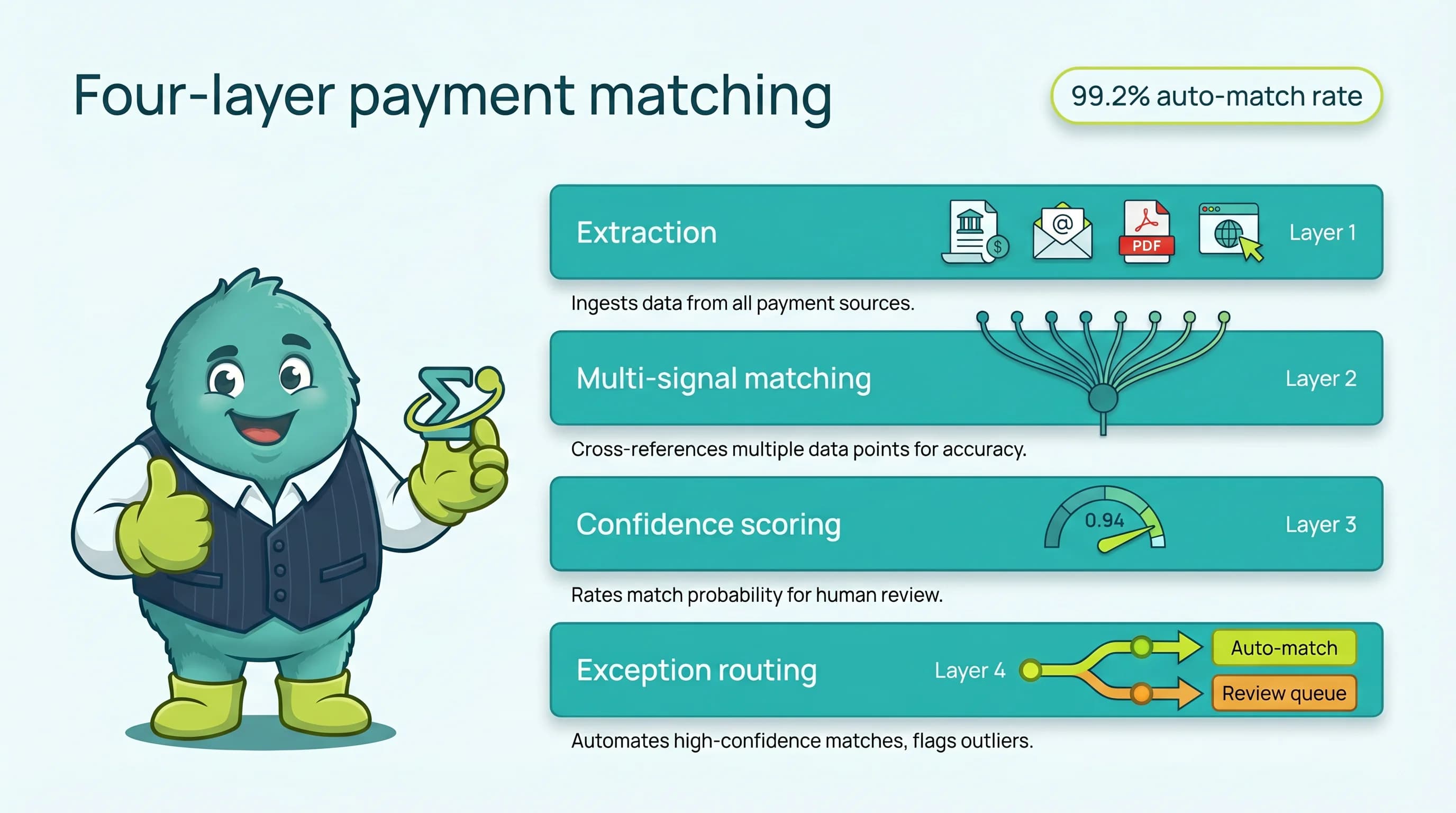
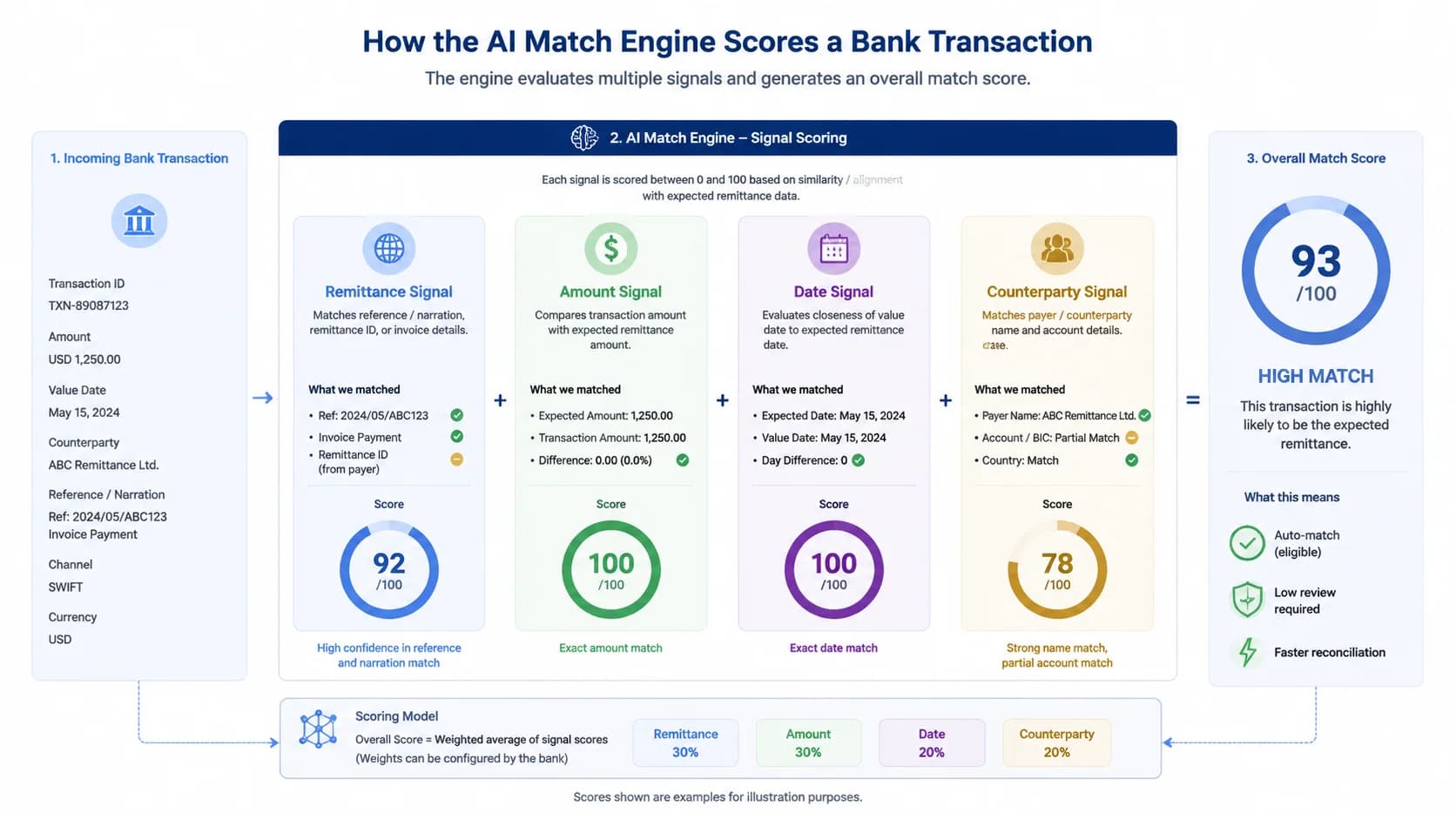
AI bank reconciliation models learn from historical matches across remittance text, amount, date, and counterparty signals to clear 99%+ of transactions without human review. Each candidate match receives a confidence score; high-confidence matches post automatically, while ambiguous transactions route to an exception queue with the model's top suggestions attached.
Older reconciliation tools relied on exact-amount matching and a few brittle rules. That works fine until a customer pays three invoices with one wire, deducts a credit memo, or remits in a slightly different name than the one on file. Modern AI matching reads four signals in parallel: the remittance text (often messy bank-of-record memo lines), the amount including any allowed tolerance, the date relative to invoice due date, and the counterparty as inferred from name, account, and prior payment history. A score combines all four.
On platforms like SINGOA, which run cash application and bank reconciliation on the same matching engine, the straight-through processing rate sits at 99.2% across mid-market customer data. Achieving that number requires the model to actually learn from your data, not just apply generic rules. Every confirmed match (and every overrule by a human) feeds back into the next decision. After 60-90 days of live operation, the engine is calibrated to your customer mix, your remittance quirks, and your typical exception patterns. Teams curious about the underlying mechanics can dig into [AI payment matching accuracy benchmarks](/blog/ai-payment-matching-accuracy) for vendor-by-vendor comparisons.
Confidence scoring is what keeps the system honest. Posting at 99.2% means the model also identified about 0.8% of transactions as not confident enough to clear on its own. Those go to a queue with the top two or three candidate matches and the reasoning behind each, which is far faster for staff to triage than starting from a blank screen. Healthy systems publish their confidence threshold; opaque systems just claim a number.
What most controllers miss: accuracy is not a fixed property of the software. It is a function of data volume, training period, and how disciplined you are about feeding back overrules.
Bank feeds and ERP integration: the connective tissue
Continuous reconciliation requires direct bank feeds (Plaid, Yodlee, or host-to-host) syncing to your ERP (NetSuite, Sage Intacct, QuickBooks, SAP) several times daily, not statement uploads. The feed pulls cleared transactions; the ERP integration writes matched journal entries back. CSV imports break the loop and force you back into batch mode.
Direct bank feeds and CSV uploads sound similar and produce wildly different outcomes. A direct feed pulls cleared transactions on a schedule (typically every 4-6 hours, sometimes hourly for treasury accounts), with no human in the middle. CSV uploads require someone to log into the bank portal, export, clean, and upload, which means reconciliation only happens as often as a person remembers to do it. If you want continuous posting, the CSV path is a non-starter; it caps you at whatever cadence your most disciplined staffer can maintain.
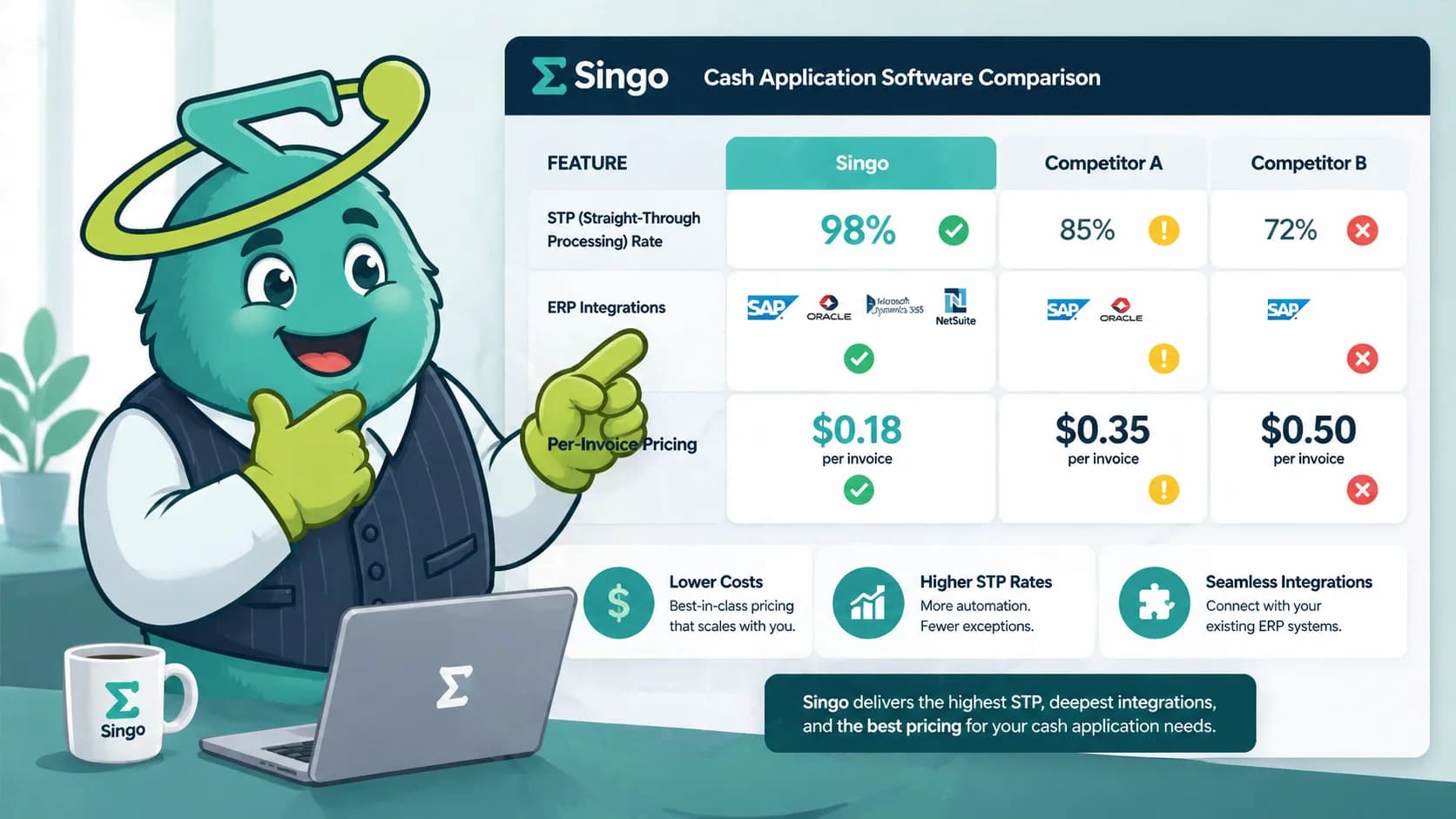
ERP integration is the other half of the equation. The big four for mid-market are NetSuite, Sage Intacct, QuickBooks, and SAP, and a credible reconciliation product supports all of them with bidirectional sync: pulling open ledger items in, writing matched journal entries back. Gartner's Financial Reconciliation Solutions overview consistently flags depth of ERP integration as the top differentiator among vendors, more than the matching accuracy claims most products lead with. You can see the full bank and ERP coverage on [SINGOA ERP and bank integrations](/integrations) for one example of what that looks like.
Setup time is where mid-market teams get burned by enterprise-shaped fears. The 6-month rip-and-replace timeline applies to BlackLine-class enterprise close suites, not to mid-market reconciliation tools. Realistic implementation for a $50M-$300M company on NetSuite or Sage Intacct is 1-2 days for the bank feed, plus a 30-60 day learning period before the matching engine reaches its steady-state accuracy. If a vendor quotes a multi-month rollout for a single-entity mid-market team, ask exactly what fills those months.
Exception handling: where humans still earn their keep
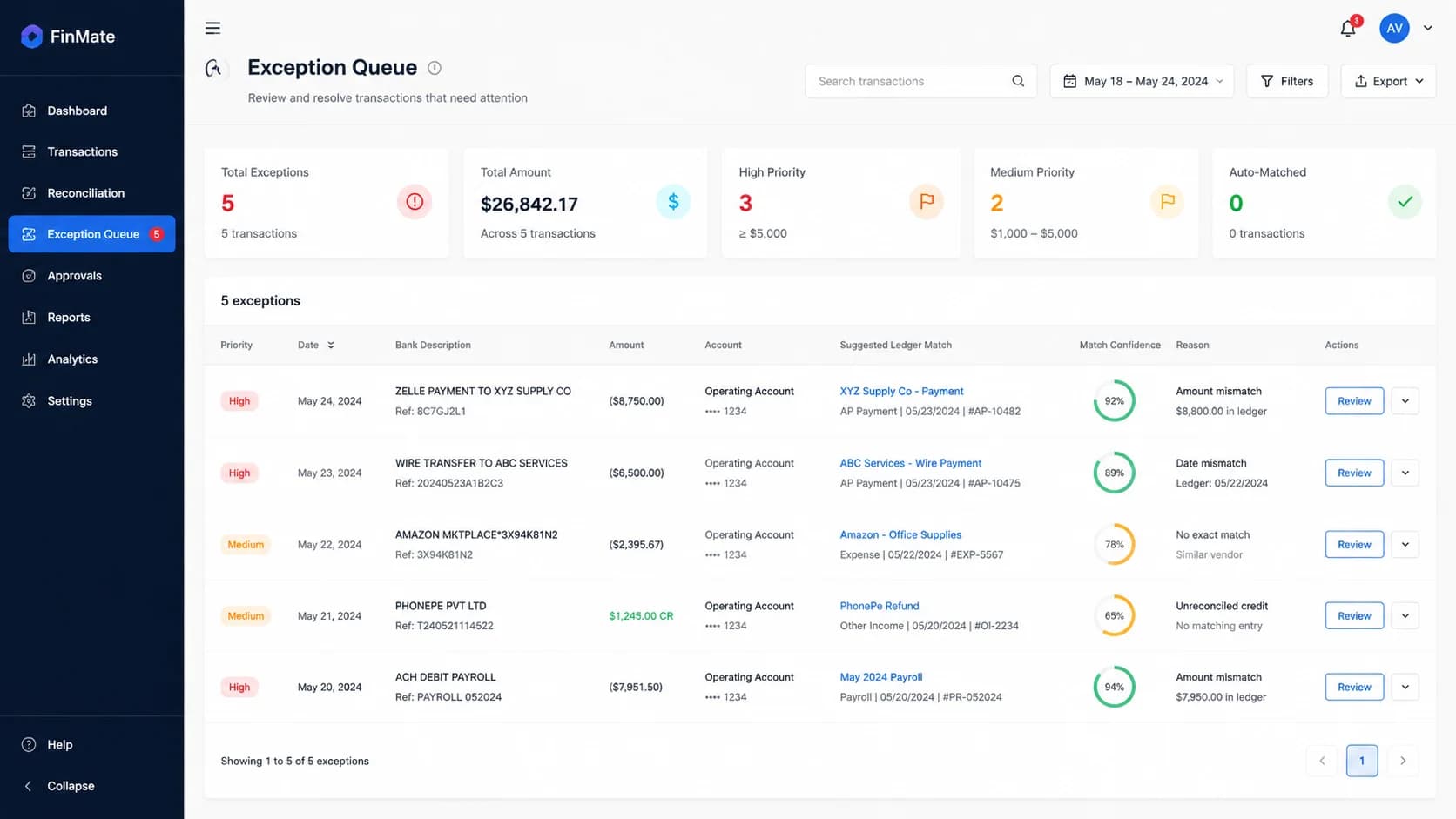
AI auto-clears 95-99% of bank transactions; exceptions like duplicates, partial payments, and unidentified deposits route to a queue where staff resolve them in minutes per item, not hours. A good queue surfaces the model's top candidate matches with confidence scores, so resolution is an approval click, not a research project.
The exception types that show up most often are predictable. Duplicate ACHs (the same payment hits twice because a customer retried). Partial payments (the customer short-paid by $112.50 because of a disputed line item). Unidentified deposits (a wire arrived with a memo line of just SETTLEMENT, no invoice reference). FX-rate variances on cross-border payments. Each of these has a known resolution pattern, and the queue exists to route them to the right person fast, not to flag them as broken.
What separates a usable queue from a frustrating one is the suggestions layer. When the engine cannot auto-clear, it should still surface the top two or three candidate matches it considered, along with the signals that drove the score. Staff confirm or overrule with a single click, and that decision feeds back into the model. A team of two AR clerks can resolve 50-80 exceptions per day this way, which is enough to keep up with a $100M business running 8,000 monthly transactions.
Be skeptical of any vendor claiming a 100% straight-through rate. The honest products publish their exception rate (1-5% is typical and healthy) and tell you exactly which transaction types tend to land there. A rising exception rate is your earliest warning system: it usually means a bank feed broke, a vendor master file changed, or a new payment channel went live without configuration. The real question is whether your tool gives you that signal before close, or after.
Pro Tip
Track your exception rate weekly. A rising rate is the earliest signal of a broken bank feed, vendor master change, or new payment channel that needs configuration before it costs you a close.
The 5-step path from month-end batch to continuous posting
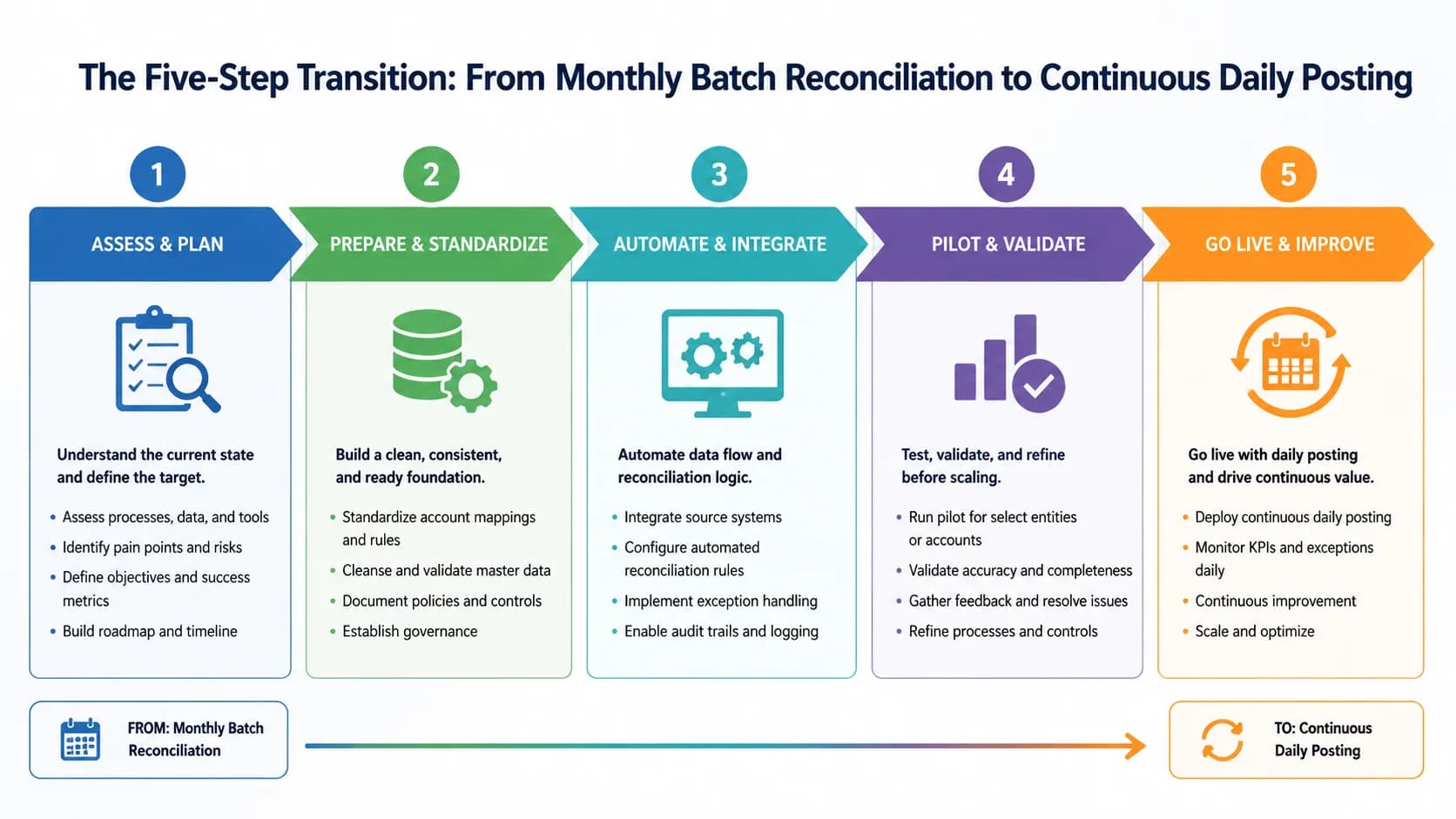
Move from batch to continuous reconciliation in five steps: connect direct bank feeds, baseline your current match rate, tune AI rules and tolerances, shift from monthly to daily cadence, then move close-day work into the prior weeks. Each step has a measurable outcome, and the cultural change matters as much as the tooling.
Step 1 is plumbing. Connect direct feeds for every operating account, payroll account, and merchant settlement account in scope. The outcome metric is simple: 100% of cleared transactions arriving in the reconciliation engine within 6 hours. Step 2 is the baseline. Run the AI matching against 30-60 days of historical activity in shadow mode, do not post yet. The outcome is a documented match rate by account and a list of the top three exception types you will tune for. Most teams discover their pain is concentrated in one or two transaction patterns.
Step 3 is tuning. Adjust amount tolerances, configure remittance parsers for your top customers, and load the vendor master variations the model needs to recognize as the same counterparty. The outcome is a pre-go-live match rate above 95%, which is the floor for a usable continuous workflow. Step 4 is the cadence shift, which is the cultural change disguised as a configuration switch. Move from running reconciliation on day 1 of the next period to running it daily. Staff stop batching their work and start clearing the previous day's exceptions every morning. Cash position visibility shifts from monthly to daily inside two weeks.
Step 5 is the part most guides skip. With routine matching automated, redistribute the work that used to live on close days. Journal entry preparation, intercompany reconciliation, accrual review, and analytical close steps all move into the prior two weeks because the underlying data is now current. The CFO sees a close cycle drop from 8-12 days to 3-5 days, but the deeper win is that the team is no longer working evenings to get there. For teams pairing this with cash application changes, the [cash application buyers guide](/blog/cash-application-software-buyers-guide-2026) covers vendor evaluation in the same depth, and Deloitte's Finance in a Digital World framework lays out the broader operating-model picture.
The real question is whether your team is ready to give up the monthly rhythm. The tools are.
What changes for the controller, the AR team, and the CFO
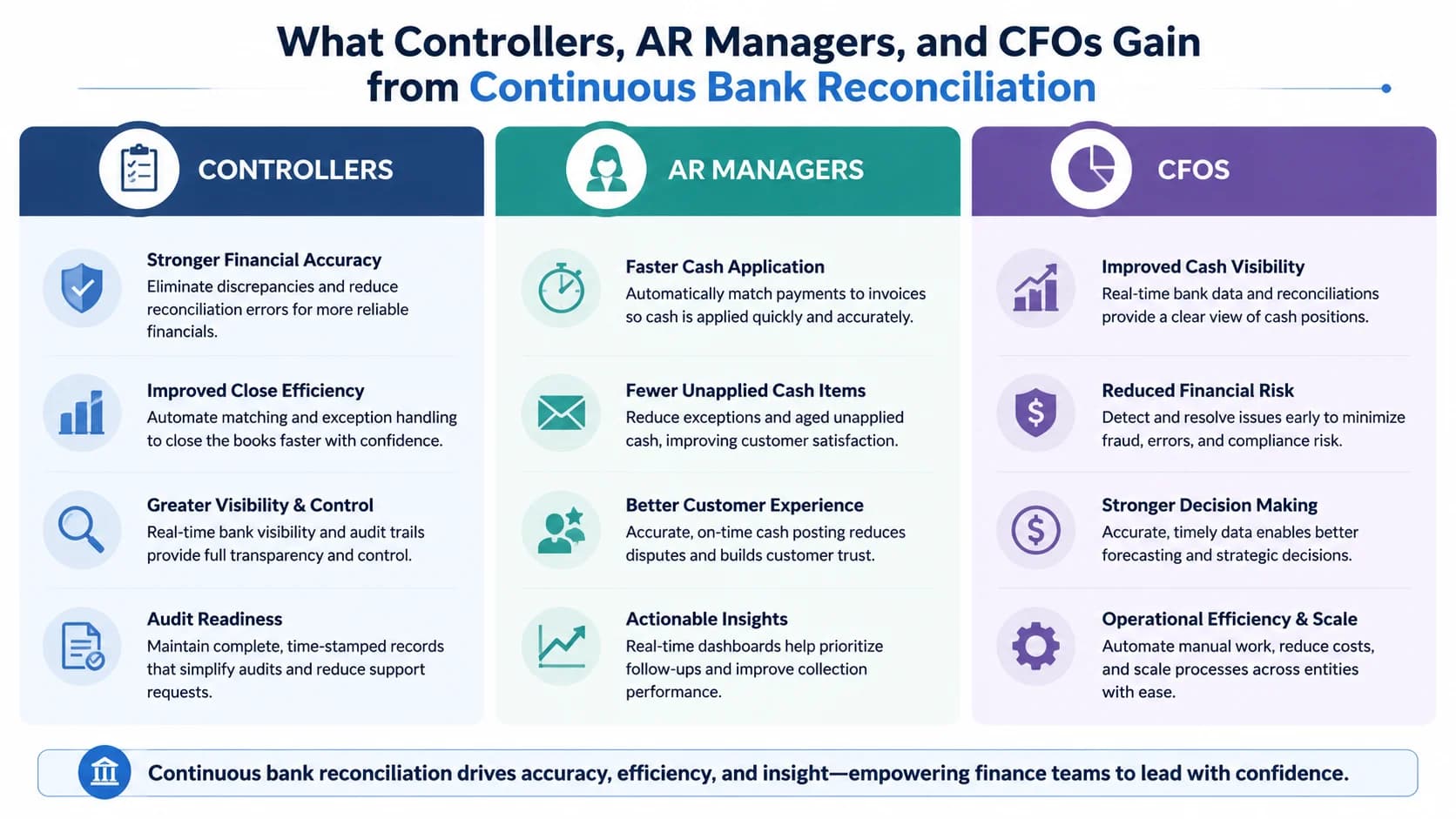
Continuous reconciliation reframes month-end from a crunch to a checkpoint. Controllers review exceptions instead of rebuilding the period from scratch, AR closes the cash loop daily rather than monthly, and CFOs gain on-demand cash visibility for treasury and forecasting decisions that used to wait for close.
For the controller, the day-to-day shifts from execution to oversight. Instead of supervising a 2-3 day reconciliation push, you spend 15-30 minutes a day reviewing the exception queue, approving suggested matches, and watching for patterns that signal a feed issue or a new payment channel. The 70-80% reduction in manual recon staff time shows up as fewer late nights for the team and meaningfully more capacity for analytical work, which is what most controllers said they wanted out of the role in the first place.
For the AR team, the cash-application loop closes the same day. Customer payments hit the bank, get matched against open invoices, and post to AR aging within hours rather than waiting for the month to close. Aged-receivable reports stay accurate enough to drive collections priorities daily, and disputes get caught while the customer still remembers the order. Teams running cash application on the same matching engine, the [AI cash application engine](/features) that powers SINGOA's payment matching, see the bank-side and customer-side workflows finally line up.
For the CFO, the headline is cash visibility on demand. Treasury decisions (sweeps, short-term investments, draw on the line) that used to wait until day 9 of close can happen on day 2. Forecast accuracy improves because actuals are current. The change is not just faster close; it is a different finance operating model, and it is the one most mid-market companies will be running by the end of the decade.
The framing that matters is simple. Automated bank reconciliation is not a faster way to do month-end. It is the end of month-end as a reconciliation event. When transactions clear daily and exceptions get resolved within 24 hours, the close that used to take 8-12 days collapses into a 3-5 day review cycle, and the team stops working evenings to get there.
The technology to support this has been mature for at least two years. Direct bank feeds, 99%+ AI matching, and real ERP integration are all table stakes from the credible vendors now. The bottleneck is rarely the software. It is the willingness to let go of the monthly batch rhythm that finance teams have run for decades, and to redesign the work that surrounded it.
If your close consistently runs past day 8 and reconciliation is the biggest line item, you already have the case for change. Start with one bank account, baseline your match rate, and let the data tell you which exceptions to tune for first. Within a quarter, the daily checkpoint will feel as natural as the monthly crunch used to feel inevitable.